Intrabar DOM Imbalance
Stop guessing whether a candle was bought or sold. Intrabar DOM Imbalance [ZynAlgo] helps you see where the volume actually sat inside each bar - an order flow imbalance indicator for TradingView that splits intrabar volume into upper-half and lower-half pressure, builds a session profile with its point of control, and marks BUY or SELL only when both agree on your TradingView chart.
Key benefits
- Volume location, not just colour: one imbalance percentage tells you whether the business inside a candle was done near the highs or near the lows.
- Session-anchored levels: Asia, London and US/NY each get their own bid/ask-style profile and POC, so entries sit at a level the current session has proven.
- Two ways to read pressure: Momentum mode pairs the imbalance with a strong candle; Divergence mode pairs it with a candle that failed to follow through.
How it works
Lower-timeframe bars inside each candle are sorted above or below the candle midpoint and the difference becomes the imbalance reading. During an enabled session the same intrabar data is stacked into a price-level profile whose heaviest level is the session POC. A BUY prints when the imbalance clears the threshold, the candle matches the chosen mode and price retests the POC and closes above it; SELL is the mirror, with a cooldown between markers. Full walkthrough in the Manual.
What's included / Platforms
- TradingView indicator, Pine Script v6, added to your TradingView username once access is granted. Released to ZynAlgo VIP members.
Best for
Intraday and session traders on volume-rich markets who want footprint-style context and POC retest entries without leaving the chart.
Get started
Browse the ZynAlgo marketplace
Disclaimer: for research and education only, not financial advice. Signals can fail and no indicator removes market risk - trade with your own plan and position sizing.
Intrabar DOM Imbalance
Why Intrabar DOM Imbalance focuses on where volume sits inside the candle
Intrabar DOM Imbalance [ZynAlgo] is built around a question a plain candle cannot answer: did the volume inside this bar trade near the highs or near the lows? The tool pulls lower-timeframe bars from inside every chart candle, sorts their volume into the upper and lower half of the candle's range, and turns the difference into one imbalance percentage. Around that reading it adds session context: for the Asia, London and US/NY sessions it stacks the same intrabar volume into a bid/ask-style profile across a set number of price levels and tracks the level that traded the most - the session POC. A BUY or SELL marker only prints when the imbalance, the candle's own shape and a retest of the active session POC agree on the same bar. The candle's colour tells you where price closed; the imbalance tells you where the business was done. One honest note: the DOM, bid and ask figures are proxies rebuilt from intrabar volume, not a live depth-of-market feed.
Understanding the intrabar imbalance
Two candles can look identical - same open, same close, same wicks - and still be very different trades. In one, most of the volume printed while price sat in the top half of the range; in the other it printed near the lows. That distribution is what the intrabar imbalance measures. It separates a candle pushed by real participation from one that drifted, and it exposes the moment heavy volume at one end of the bar failed to move the close - the footprint of absorption.
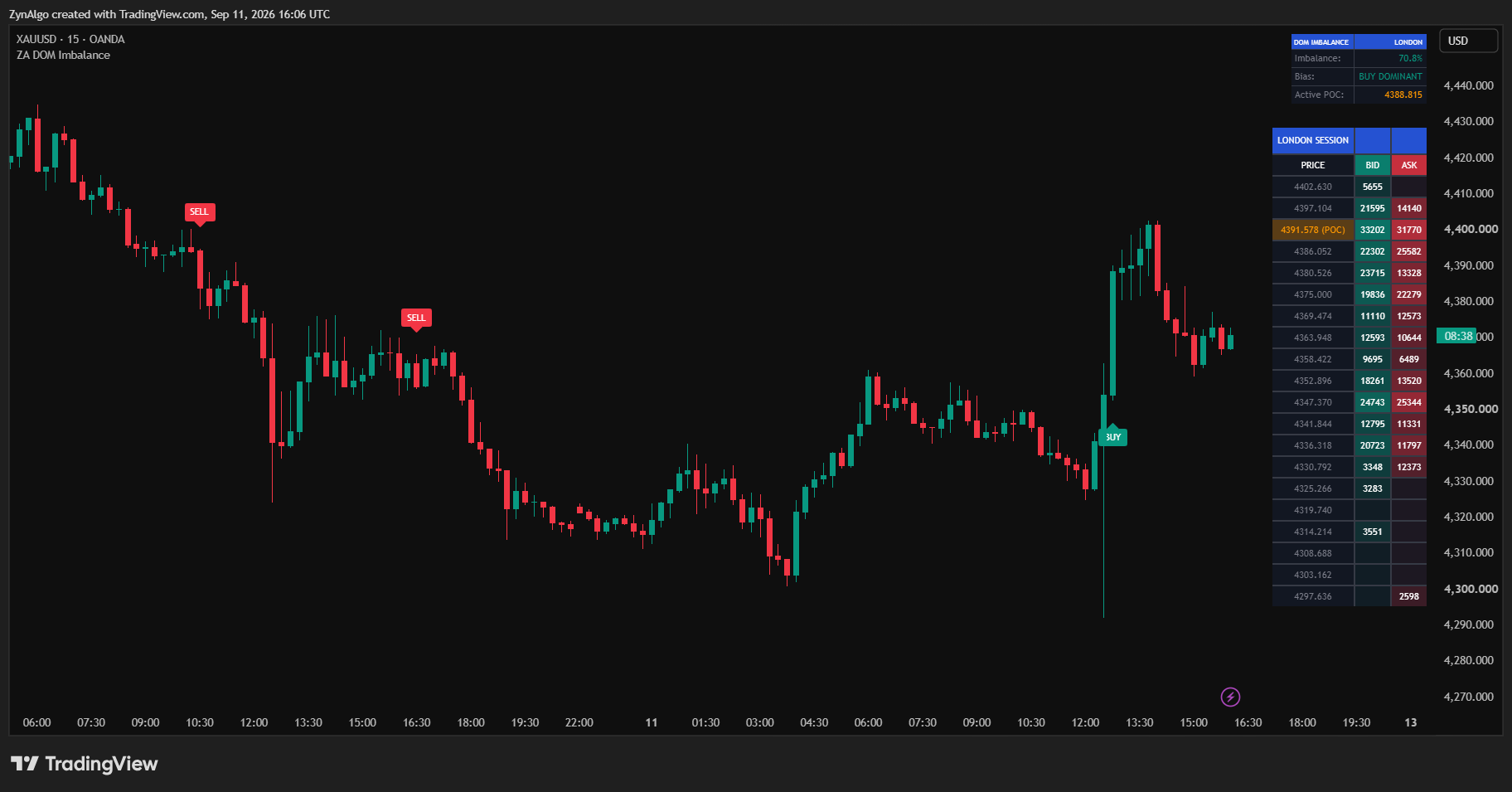
What you see on the TradingView chart:
- a teal BUY label below the bar and a red SELL label above the bar, only on candles that pass every rule; the chart text stays short, and hovering the label opens a tooltip with the full reason for that entry - signal type, the imbalance reading against your threshold, the candle body ratio against its minimum, the session name, the POC price that was retested and the close;
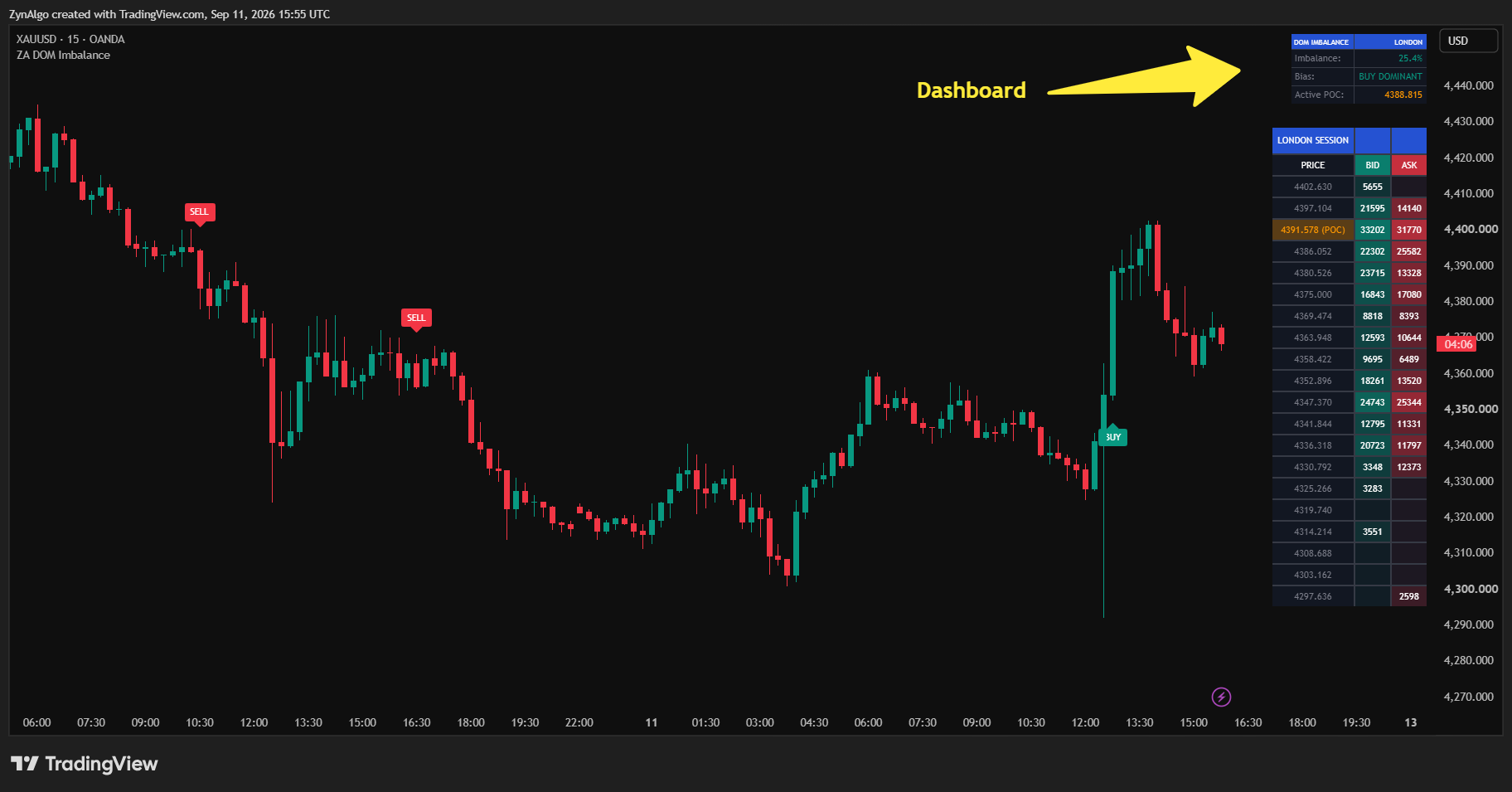
- a top-right dashboard headed "DOM IMBALANCE" with the active session name (ASIA, LONDON, US/NY or NONE) and three rows: Imbalance (the current bar's reading in %, teal above the threshold, red below the negative threshold, grey between), Bias (BUY DOMINANT, SELL DOMINANT or NEUTRAL) and Active POC (the live session POC price in the POC highlight colour, orange by default);
- a DOM table on the right edge with PRICE, BID and ASK columns, one row per price level from the session high down to the session low, BID cells shaded teal and ASK cells shaded red in proportion to volume, and the POC row tagged "(POC)".
Common mistake: treating a big imbalance number as a trade on its own. The reading exists on every candle, but a marker also needs the right candle shape and a POC retest. A second mistake is reading the table as a real order book - it is a session volume profile split by the direction of each lower-timeframe bar. One limitation worth knowing up front: TradingView caps how much lower-timeframe history it will serve, so on older bars the intrabar feed runs out; the tool stays silent there instead of estimating, which is why the markers and the profile cover recent history only.
How the intrabar imbalance is defined
- Lower Timeframe (Minutes): the intrabar feed. Every chart candle is broken into bars of this size (default 1 minute); their close and volume are what the tool sorts.
- Upper / lower half split: the candle midpoint is (high + low) / 2. Intrabar volume closing at or above it counts as upper-half, the rest as lower-half. Imbalance % = (upper - lower) / total x 100, so +100 means all volume traded in the top half and -100 all of it in the bottom half.
- Imbalance Threshold (%): the minimum absolute reading (default 20) for a candle to count as imbalanced.
- Session profile (Number of Price Levels): while an enabled session is live, its running high-low range is divided into this many levels (default 20). Each intrabar bar's volume is added to its level as BID when the bar closed above its open, ASK when it closed below, or half to each when flat.
- Session POC: the level with the largest BID + ASK total, priced at the midpoint of that level. It is rebuilt as the session extends and cleared when the next session starts.
- Active session: Asia, London and US/NY each have an Enable switch and a Session Hours input, read in the fixed Session Timezone (UTC). Where hours overlap, Asia outranks London and London outranks US/NY. Outside every enabled session there is no active POC and no marker can print.
- POC Touch Tolerance (x ATR): a 14-period ATR multiplied by this value (default 0.3) sets how close a wick must come to the POC to count as a retest.
When to act on a signal - and when to stand aside
The Signal Type input decides which candle shape may pair with an imbalance. Momentum wants a strong candle that agrees with the imbalance; Divergence wants a candle whose colour disagrees with it - the absorption read.
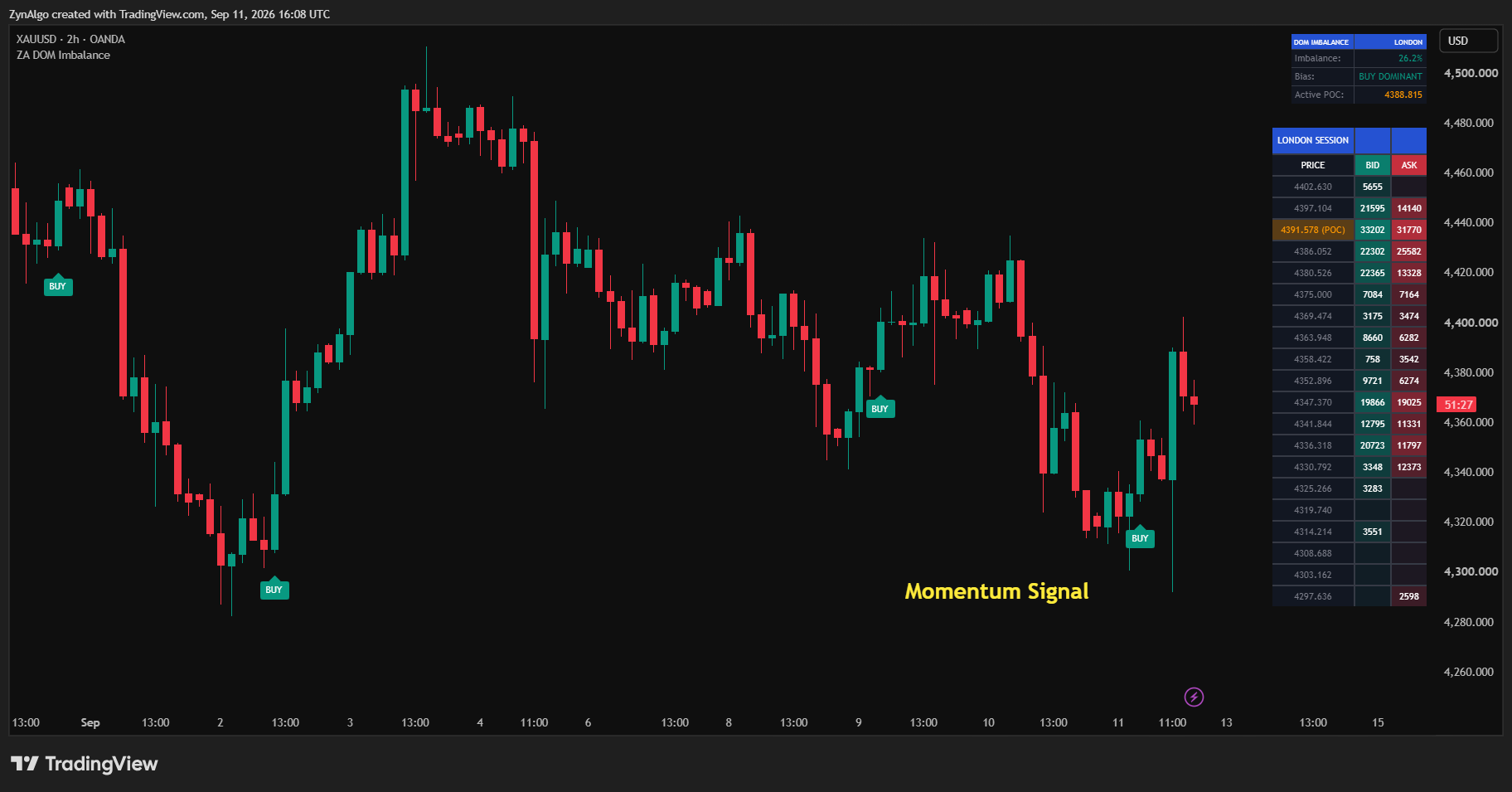
A BUY marker (a teal BUY label under the bar) prints when all of these hold on one candle:
- the imbalance reading is at or above the Imbalance Threshold, so volume was concentrated in the upper half of the bar;
- the candle matches the Signal Type: with Momentum it closed above its open with a body of at least the Min Body Ratio for Momentum (%) of the full range; with Divergence it closed below its open despite the upper-half volume;
- the candle's low reached the tolerance band around the active session POC and the candle closed back above the POC;
- at least Signal Cooldown (Bars) bars have passed since the previous BUY or SELL marker.
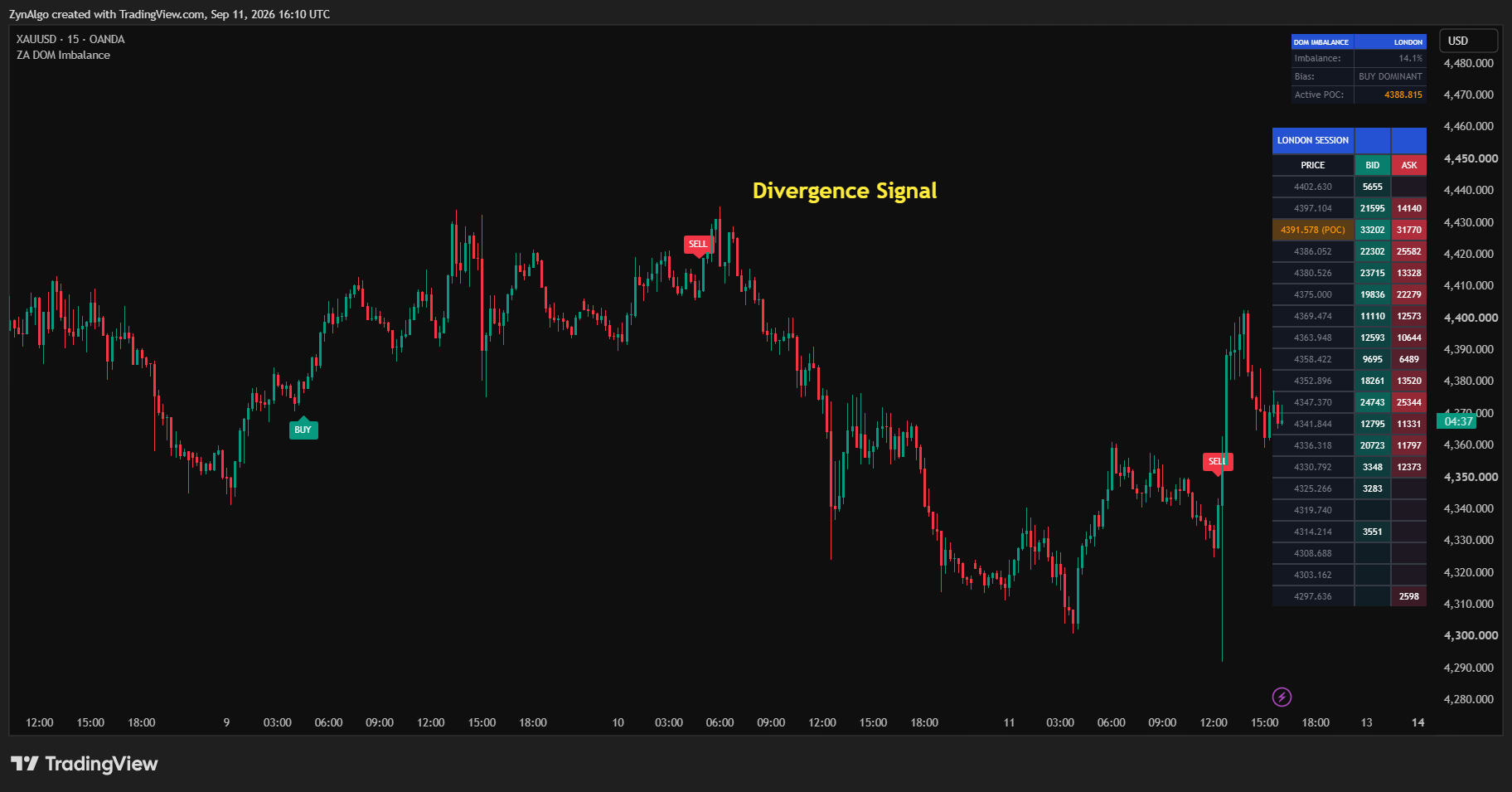
A SELL marker (a red SELL label above the bar) is the mirror image: imbalance at or below the negative threshold, a candle that closed below its open with the minimum body (Momentum) or closed above its open (Divergence), a high that touched the POC band with a close below the POC, and a cleared cooldown.
When to stand aside: there is no signal outside an enabled session, none when the imbalance is large but the candle shape fails, and none when price is nowhere near the session POC - the dashboard still shows Imbalance and Bias then, and that is context, not an entry. Every marker carries its own reason: hover the BUY or SELL label and the tooltip spells out the signal type in force, the imbalance percentage measured on that bar next to your threshold, the body ratio next to its minimum, the active session, the POC price that was retested and the closing price - plus a reminder that the bid/ask/DOM figures are a proxy rebuilt from lower-timeframe volume, not a real order book. Markers are released on confirmed candle closes only, so one that appears will not move or disappear afterwards and what you see live is what stays on the chart; the session profiles are fed the same way, from closed candles. Two alert conditions, "[ZynAlgo] DOM Imbalance - BUY" and "[ZynAlgo] DOM Imbalance - SELL", fire on the same rules as the markers.
Tuning how often markers appear. If they are too rare, lower Imbalance Threshold (%) so more candles qualify as imbalanced, or raise POC Touch Tolerance (x ATR) to widen the band that counts as a retest; if they arrive too often, tighten those two or lengthen Signal Cooldown (Bars). Momentum can also be loosened on its own by lowering Min Body Ratio for Momentum (%). One more practical point about overlapping hours: the dashboard, the table and the signals all follow the higher-priority session, so if you want to work London while Asia is still counted as active, switch the higher-priority session off in Session Settings.
Who benefits most from Intrabar DOM Imbalance
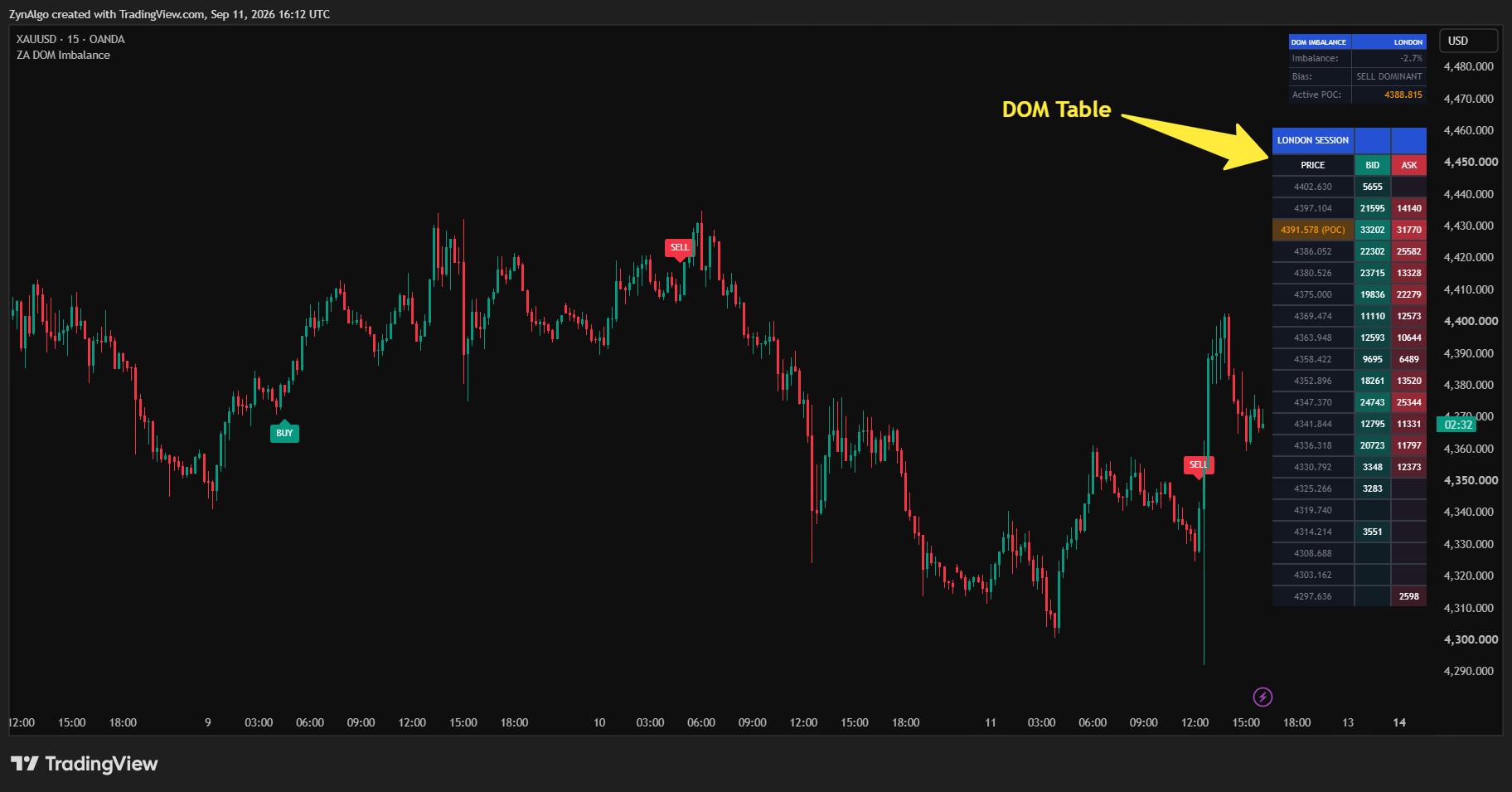
- Order-flow minded traders without a footprint platform: you want to know which half of the candle carried the volume and where the session's point of control sits, straight from your chart.
- Session traders: you work the Asia, London or US/NY window and want entries anchored to that session's own POC rather than a level carried over from yesterday.
- Absorption and momentum readers: Divergence mode flags heavy volume that failed to move the close; Momentum mode flags volume that pushed with the candle.
- Intraday traders on volume-rich instruments: futures and crypto with real volume give the lower-timeframe feed the most to work with.
The edge is not in the imbalance number by itself but in demanding that it, the candle and a proven session level all say the same thing before you act. Fewer markers built on three agreeing facts beat a stream of markers built on one.
Browse the ZynAlgo marketplace
Risk note: Intrabar DOM Imbalance [ZynAlgo] is a decision-support tool, not a trading system or financial advice. Signals can fail and no indicator removes market risk - always use your own stop placement and position sizing.
- Intrabar DOM Imbalance [ZynAlgo] v1Sep 17, 2026