Dynamic Trail Breakout Pro
Most trend tools put you in at the first push and then leave you guessing on every pullback - is this a healthy dip to add into, or the start of a reversal? Dynamic Trail Breakout Pro [ZynAlgo] runs two trailing lines at once, maps the pullback while it is still forming, and only marks a re-entry when price snaps back in agreement with the main trend on stronger volume.
Key benefits
- Two trails, one read: a slow trail defines the trend while a fast trail catches the short-term pullback, so the pullback is drawn, not guessed.
- Confirmed re-entries: a diamond prints only when the dip resolves back with the trend and the breakout bar carries above-average volume.
- Trade-ready levels: entry, an ATR-scaled stop and up to three measured targets are projected, with a live performance dashboard.
How it works
Dynamic Trail Breakout Pro [ZynAlgo] builds two Supertrend trails from the same ATR - a slow one for the main trend and a faster one for the trigger. When the fast trail flips against the trend but price holds the slow trail, the tool shades a pullback cloud between the lines. When the fast trail flips back into agreement and the breakout bar clears the volume filter, it prints a directional diamond and lays out the entry, stop and targets. Full walkthrough in the Manual.
What's included / Platforms
- TradingView indicator, Pine Script v6, added to your TradingView username once access is granted. Released to ZynAlgo VIP members.
Best for
Trend and continuation traders working intraday to daily charts who want to buy dips and sell rallies inside an established trend, with the pullback mapped and the levels worked out before they act.
Get started
Browse the ZynAlgo marketplace
Disclaimer: Trading involves risk. Signals, levels and tracked statistics are analytical references only and do not guarantee future results - always trade with your own plan and position sizing.
Dynamic Trail Breakout Pro
Trading the pullback, not the first push
Dynamic Trail Breakout Pro [ZynAlgo] is built around one idea: the safest place to join a trend is not the first breakout, it is the moment a healthy pullback fails and price snaps back with the trend. Chasing the initial push means buying into extension; waiting for the dip to resolve means entering where risk is defined and the trend has just reasserted itself.
The philosophy is deliberately two-speed. A slow trail sets the main trend and holds its ground through noise, while a faster trail tracks the short-term swings inside it. When those two disagree, the market is pulling back; when they line up again on stronger volume, the pullback is over. On TradingView you get a live map of where price is resting, where it re-entered, and a full plan attached to each re-entry.
The dual trailing engine
A single trailing stop forces one compromise: set it tight and every wiggle stops you out, set it wide and you give back half the move. Dynamic Trail Breakout Pro runs two at once so each does one job well - the slow trail decides which way the trend is pointing, and the fast trail decides whether the current wobble is just a pullback.
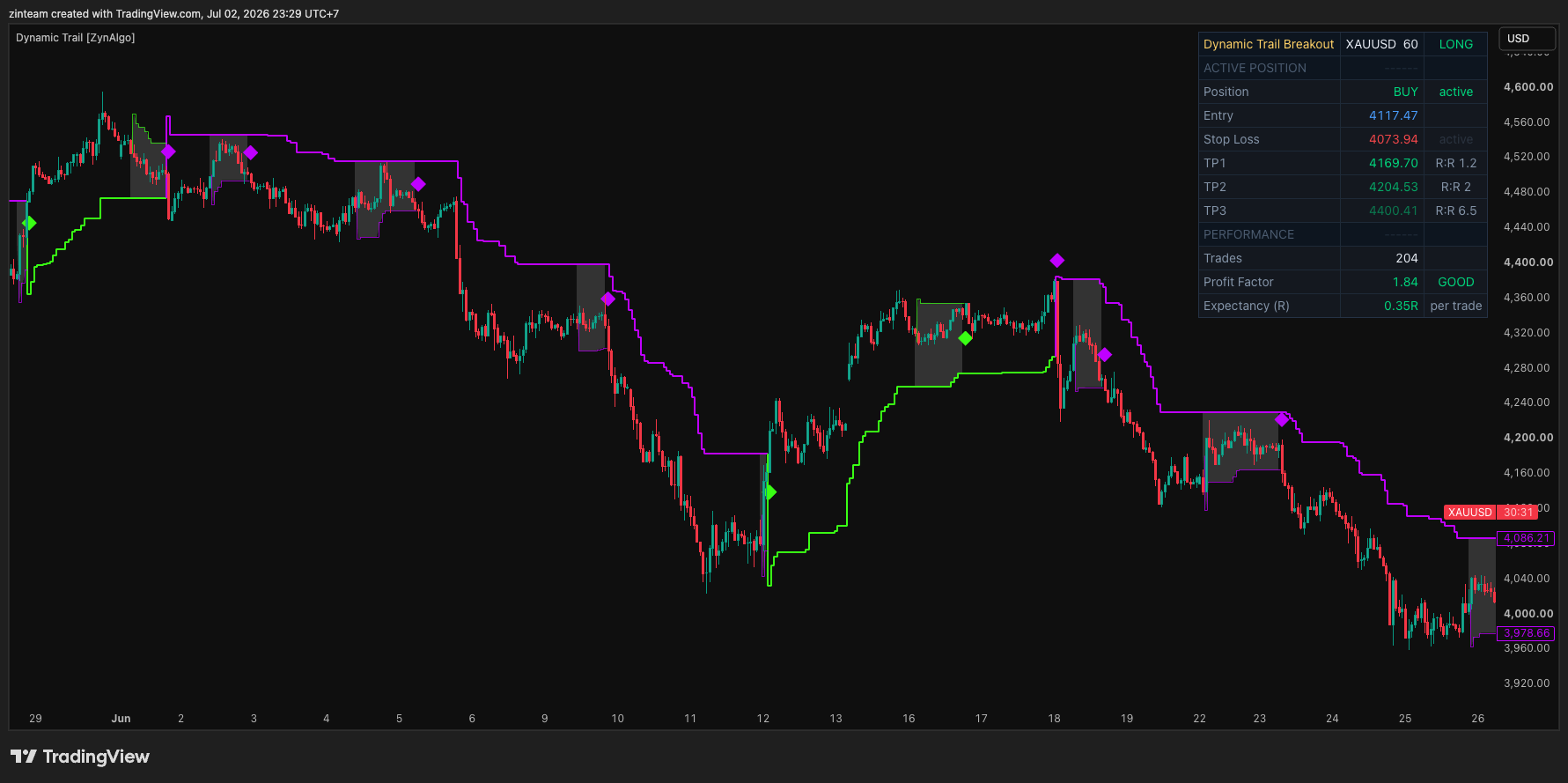
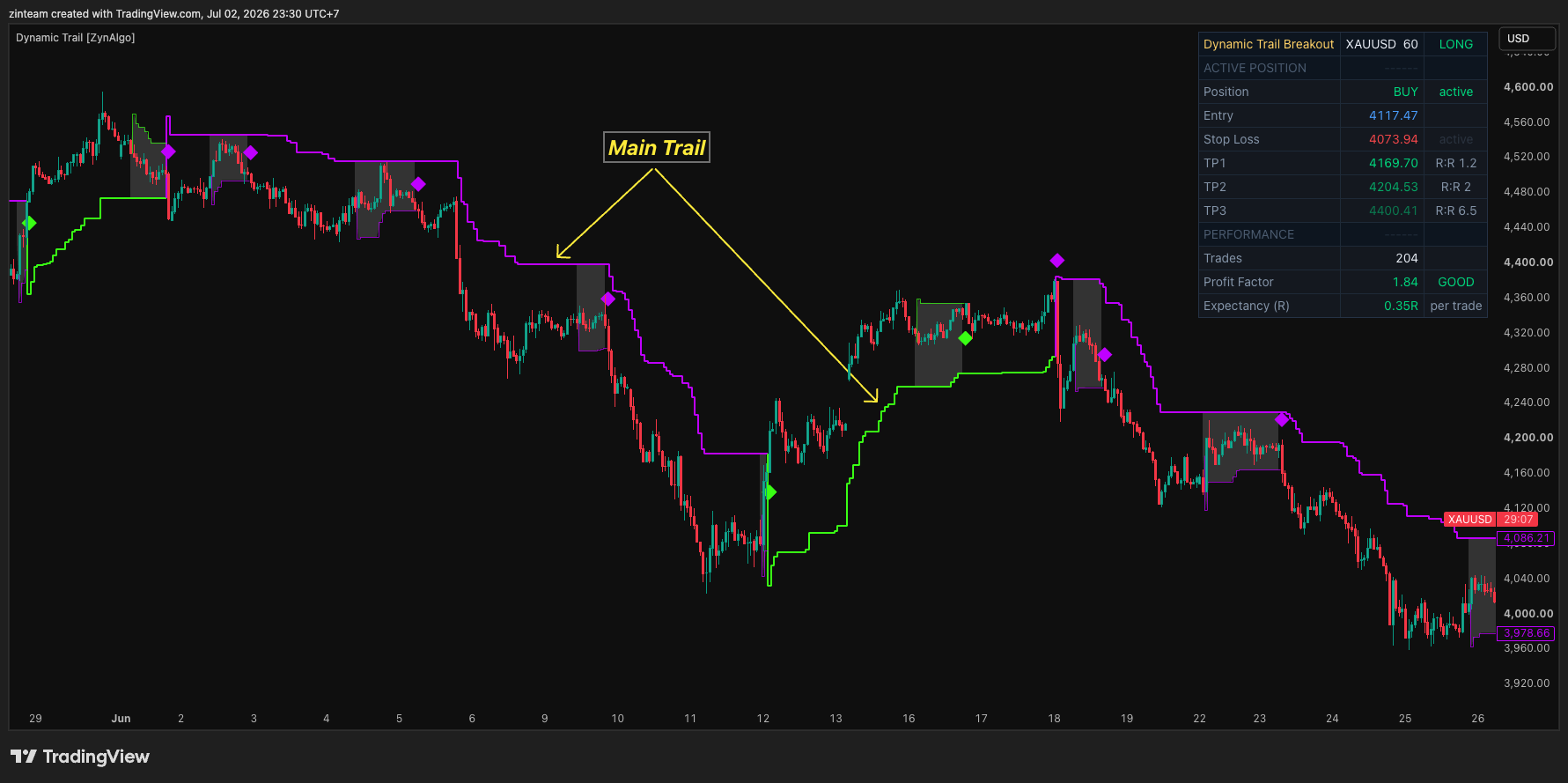
What the two trails look like on your chart:
- a bold stepline for the slow trail, the main trend, coloured neon green when the trend is up and purple when it is down;
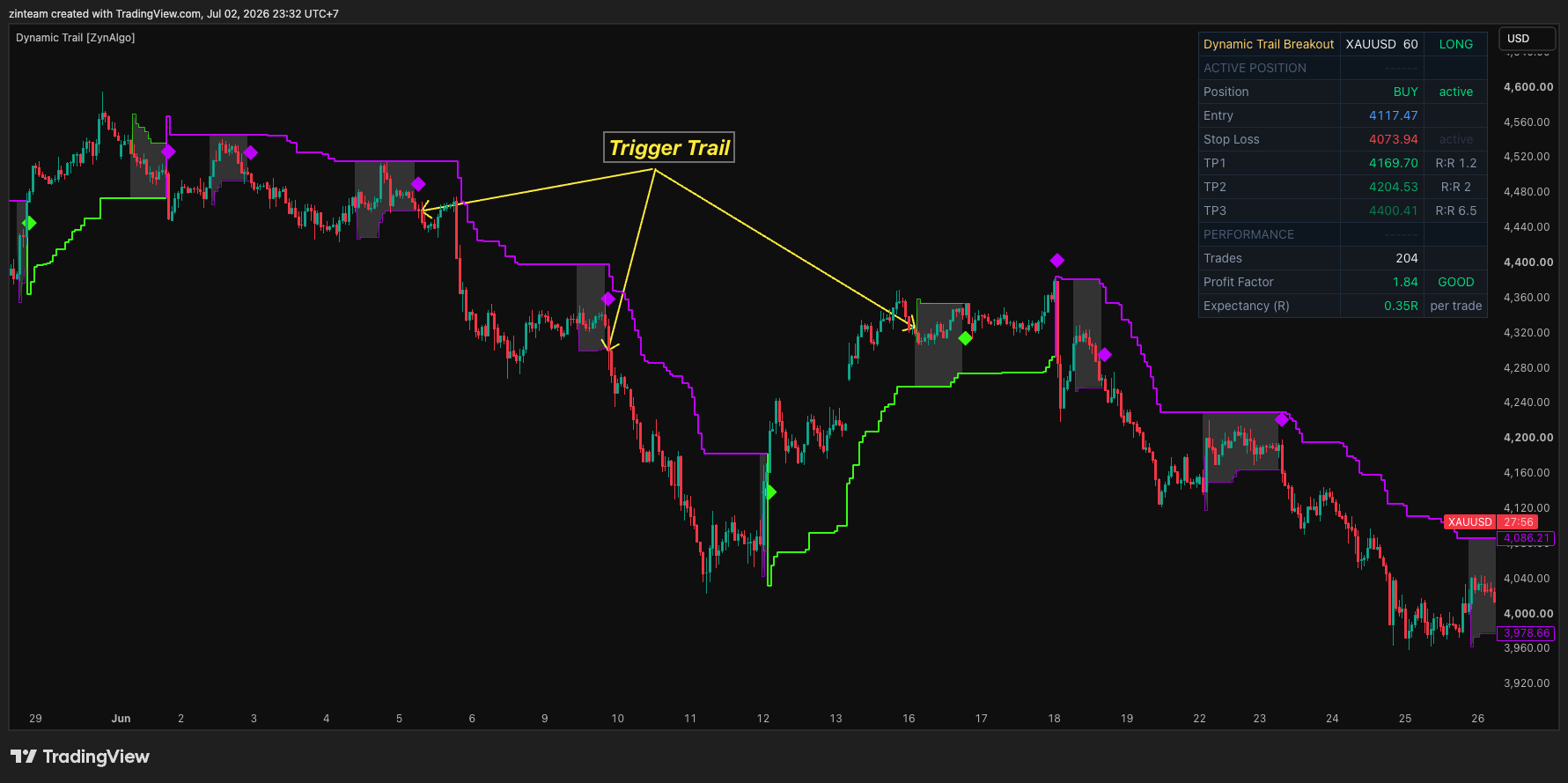
- a thinner fast trail that only shows itself when price has pulled back, kept off the chart while the trend runs clean;
- the trend colour flips only when price closes through the slow trail, so the main read stays stable through ordinary noise.
The common mistake is reacting to every flip of a fast stop. Here the fast trail never decides the trend on its own - it only earns attention when it disagrees with the slow trail, and that disagreement is exactly what the tool is watching for.
The pullback cloud
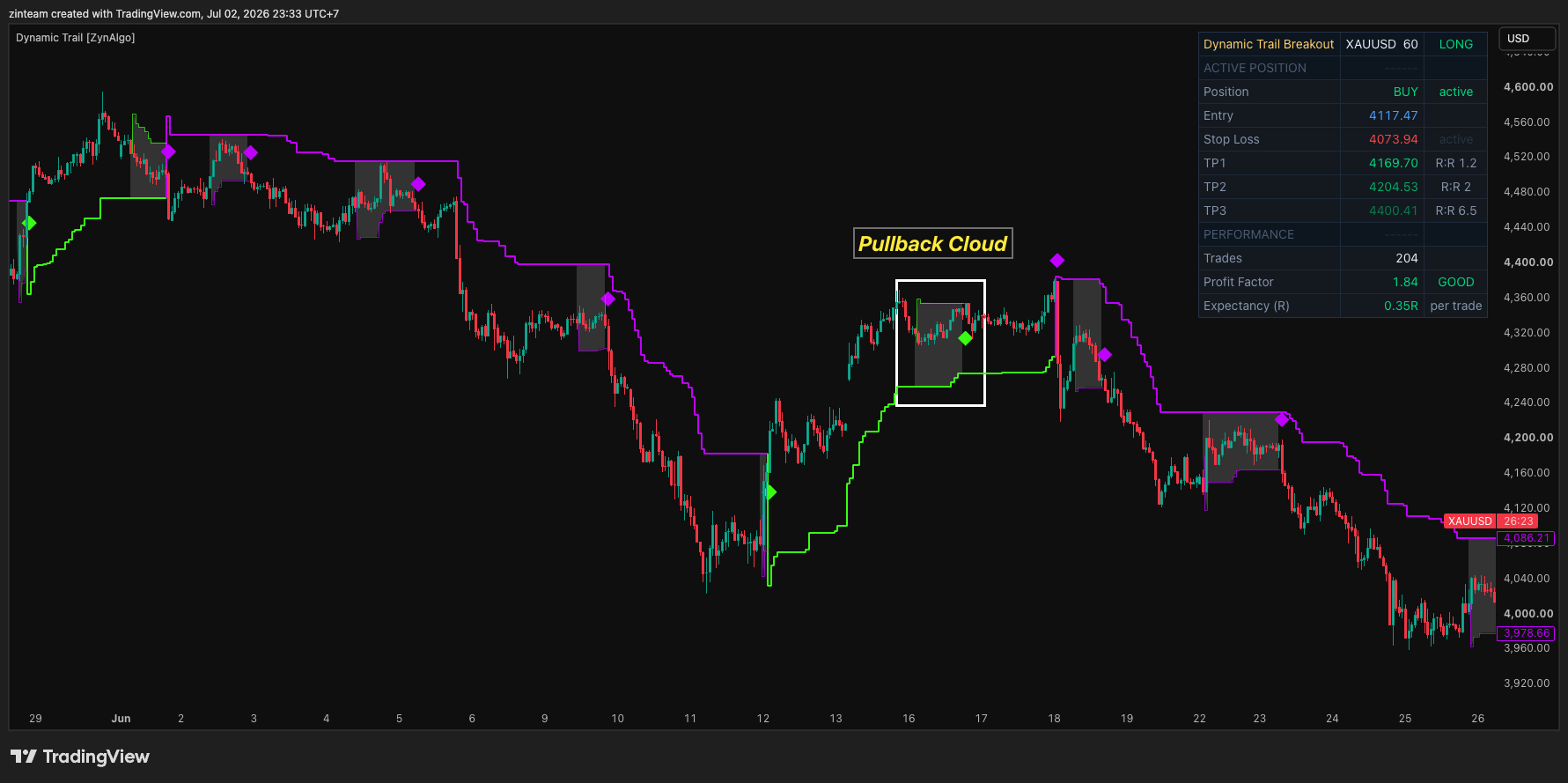
When the slow trail still says up but the fast trail flips down - or the mirror image in a downtrend - the market is inside a pullback. Dynamic Trail Breakout Pro shades the space between the two lines as a pullback cloud, so the dip is visible while it is still forming rather than obvious only in hindsight.
- Cloud on: the fast trail has flipped against the trend while price holds the slow trail. This is the dip - the zone to watch, not yet to act.
- Cloud off: the two trails agree and price is running with the trend. The fast trail and the cloud fade away to keep the chart clean.
- The cloud does not fire a signal by itself. It marks the setup; the trigger is what happens when price leaves it.
The volume filter
Not every snap-back out of a pullback deserves a trade. The optional volume filter compares the breakout bar against a moving average of volume and only lets the re-entry signal fire when the bar carries above-average participation.
- Filter on (default): the re-entry bar must trade on more than its recent average volume, so quiet drifts back into the trend are ignored.
- Filter off: every qualifying re-entry is marked, whatever the volume behind it.
- The average length is adjustable, so you can tune how demanding "above average" has to be for your market and timeframe.
Reading the signals and the plan
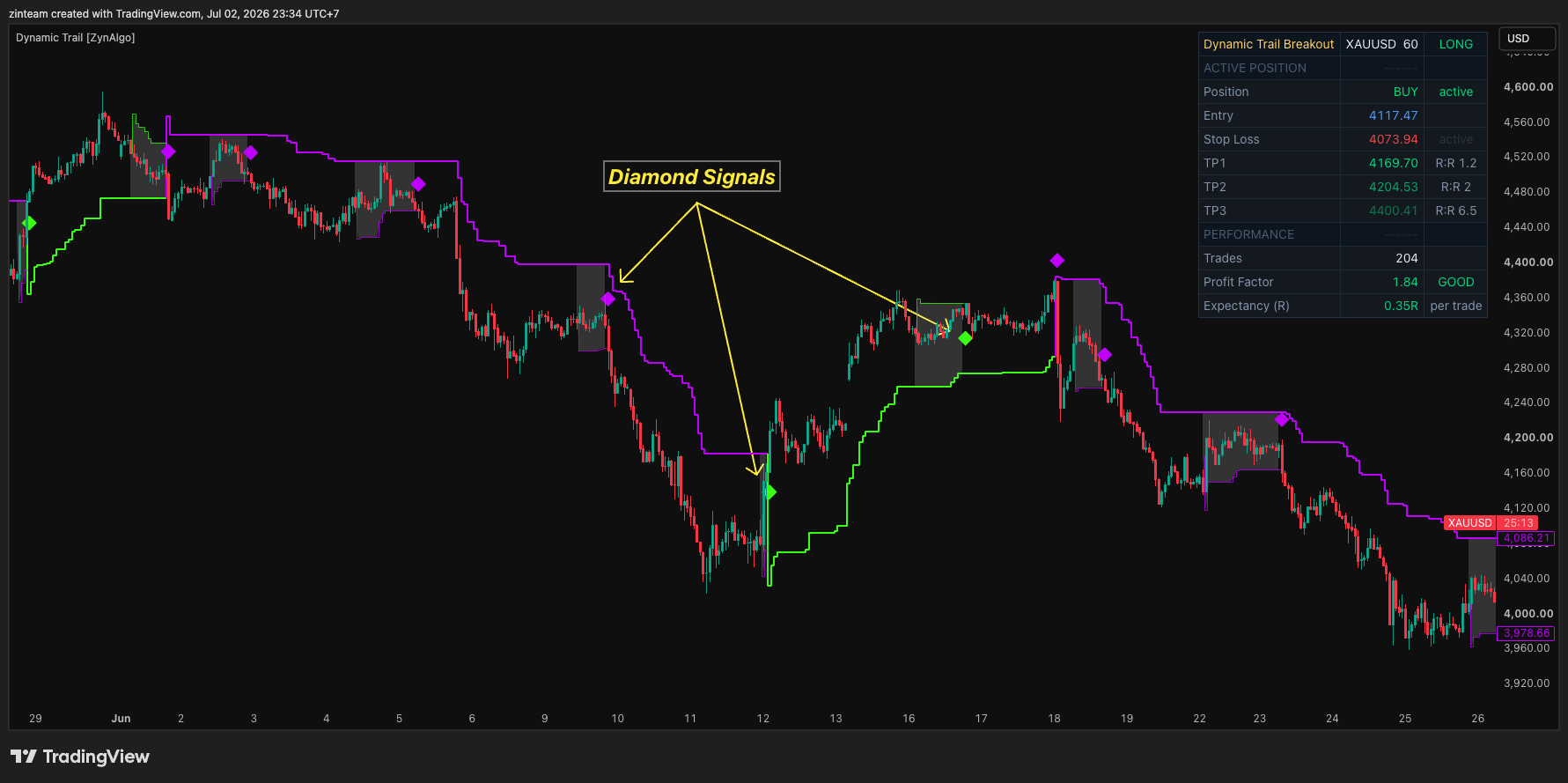
A diamond only prints when three things line up in order: price is in a pullback (slow and fast trails disagree), the fast trail flips back into agreement with the trend, and the breakout bar clears the volume filter. Bullish re-entries print a diamond below the bar; bearish re-entries print one above.
Every signal arrives with its levels already worked out:
- the close of the re-entry bar is the entry reference;
- the protective stop is placed an ATR-scaled distance away, set by your Distance input;
- up to three targets (TP1, TP2, TP3) are projected at your chosen risk-to-reward ratios, with a break-even shift after the first target is reached;
- a trade times out automatically after a maximum number of bars, so a stalled position does not sit open indefinitely;
- the dashboard tracks the running position, Trades, Profit Factor and Expectancy (R) so you can see how the settings have behaved on this market and timeframe.
The dashboard header tells you the current state at a glance - READY when it is waiting, LONG or SHORT when a trade is live, and OFF SESSION when an optional time window has trading paused. Below it, the active position block shows the entry, stop and each target with its R:R, and the performance block summarises how the current settings have played out.
An optional session filter, off by default, restricts new signals to a chosen time window and timezone, while any trade already open continues to manage itself. Alerts mirror the chart: a confirmed bullish or bearish continuation each fires its own alert so you can wire the same signals into your own workflow.
Who Dynamic Trail Breakout Pro fits
- Trend continuation traders: you would rather add into an established trend on a pullback than chase the first breakout, and you want the pullback mapped in advance.
- Structure-based sizers: you frame risk from the setup itself, and want the stop distance and targets measured before you commit.
- Traders tired of noisy stops: you want one stable read on the trend and a separate, faster read on the pullback, instead of a single stop that whipsaws.
- Intraday and session traders: the optional time window keeps signals inside the hours you actually trade.
A pullback that resolves back into the trend on real volume deserves more attention than a dozen quiet drifts. The trend is the context; the re-entry is the trigger.
Browse the ZynAlgo marketplace
Risk note: Dynamic Trail Breakout Pro [ZynAlgo] is a charting and signal tool, not a guarantee of results. Signals, trails, projections and tracked statistics are analytical references only, and past behaviour does not predict future performance - always trade with your own plan and risk management.
- Dynamic Trail Breakout Pro [ZynAlgo] v1Aug 13, 2026