Pre-News Flow Bias
Pre-News Flow Bias [ZynAlgo] turns the noisy hours before a scheduled release into one clear pre-news bias on your TradingView chart. This news trading indicator for TradingView accumulates estimated buy-minus-sell volume ahead of the event, locks that bias the moment the news hits, and marks only a post-news pullback entry that agrees with it.
Key benefits
- Bias before the headline: a running cumulative delta shows whether the market has been quietly buying or selling into the event.
- One disciplined entry per event: after the release the tool waits for a rejected pullback in the locked direction and prints at most one ▲ or ▼ marker.
- Countdown and alerts built in: a dashboard counts down to the event, an early-warning alert fires minutes before it, and BUY/SELL alerts fire on the marker.
How it works
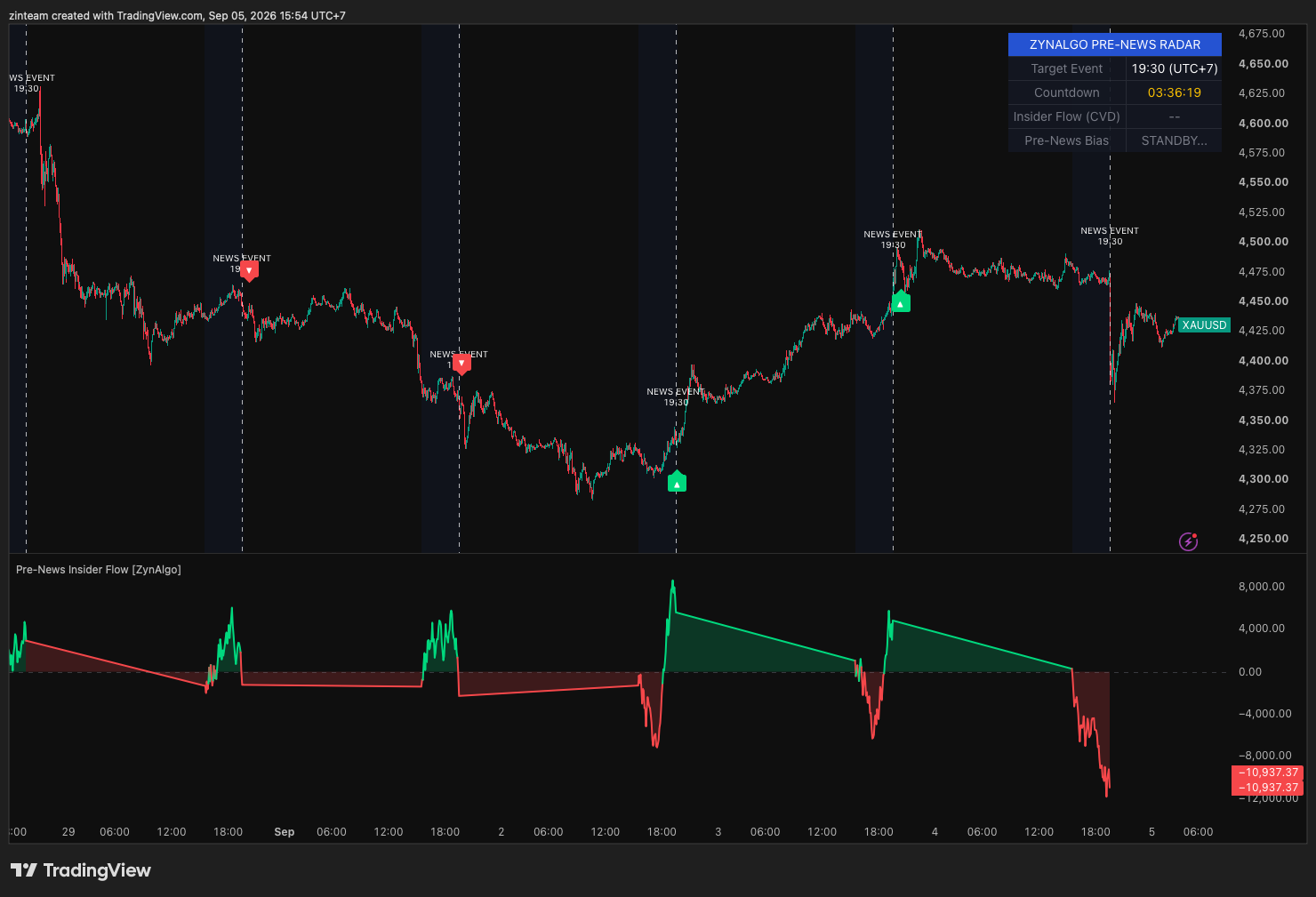
Inside a scan window before your configured event time, the indicator estimates buy and sell volume from where each bar closes within its range and plots the cumulative delta as a green or red area in its own pane. On the news bar that sign is locked as the bias; in the bars that follow, a sweep of a recent low that closes up prints ▲ BUY under a bullish lock, and a sweep of a recent high that closes down prints ▼ SELL under a bearish lock. Hover a marker to read the reason. Full walkthrough in the Manual.
What's included / Platforms
- TradingView indicator, Pine Script v6, added to your TradingView username once access is granted. Released to ZynAlgo VIP members.
Best for
Intraday traders who trade scheduled releases and want a defined pre-news bias plus one post-news entry rule instead of reacting to the first spike.
Get started
Browse the ZynAlgo marketplace
Disclaimer: for research and education only, not financial advice. Signals can fail and no indicator removes market risk - trade with your own plan and position sizing.
Pre-News Flow Bias
How Pre-News Flow Bias approaches scheduled news trading
Pre-News Flow Bias [ZynAlgo] is built around one question: which way was the market leaning before the release? Instead of guessing whether the number will be good or bad, it measures the buying and selling that accumulates in a defined window ahead of a scheduled event, turns that into a bullish or bearish pre-news bias, and treats the release itself as the catalyst rather than the signal. Three things are tracked on your TradingView chart: the event clock (news time, timezone and a live countdown), the estimated cumulative volume delta inside the scan window, and a short post-news window in which price is watched for a rejected pullback in the locked direction. The result is one structured way to trade an event - know the bias before the headline, then take at most one confirmed entry after it.
Inside Pre-News Flow Bias: the locked pre-news bias
The core concept is the locked pre-news bias. Around scheduled events, positioning tends to show up in volume before it shows up in price: participants who want exposure ahead of the number build it across the hours before it. Summing estimated buy minus sell volume across that window compresses diffuse activity into one signed number. When the news bar arrives, that sign is frozen as the working bias for the post-news window, so a violent first reaction cannot flip it - the tool stays with the side that had been building.
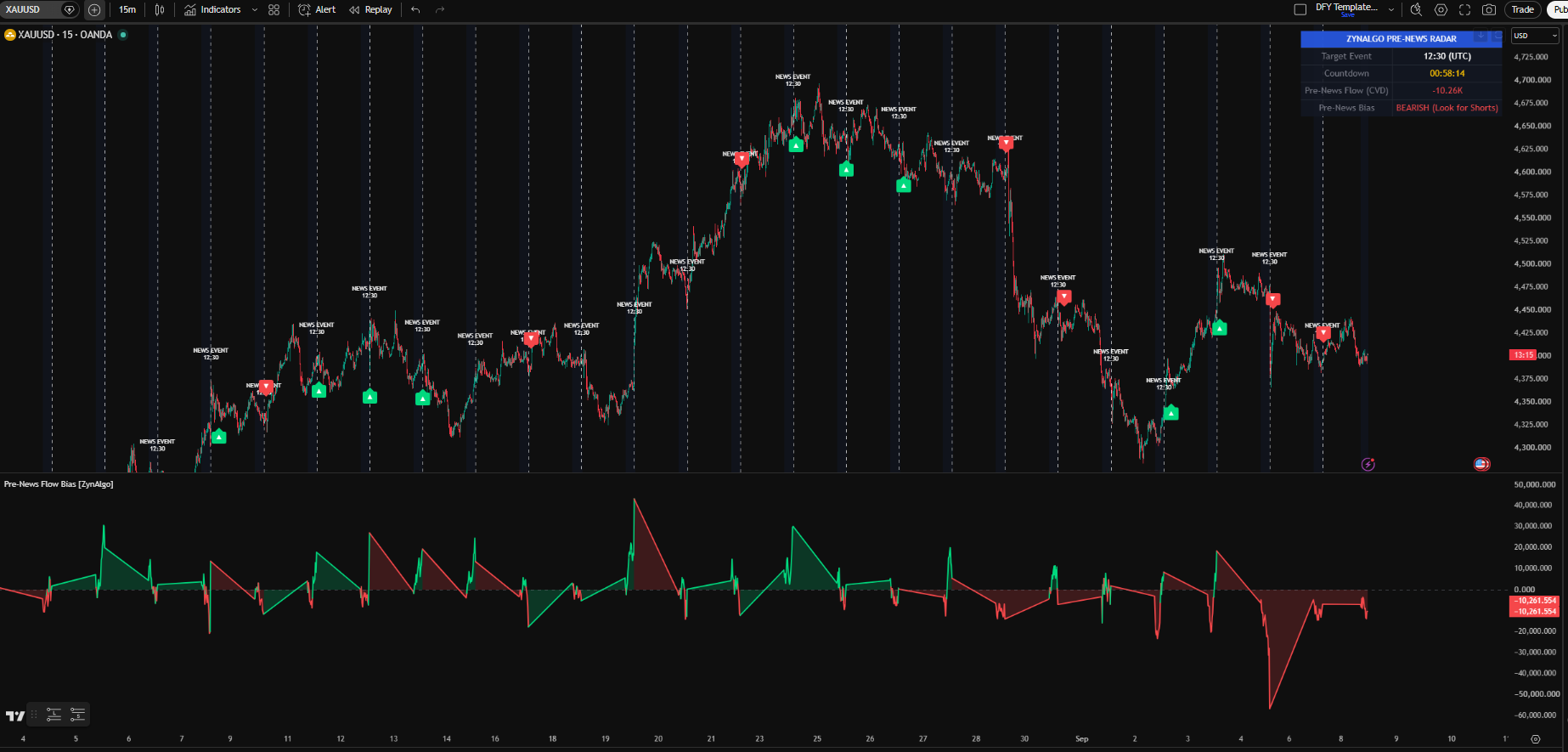
What you see on the chart while the radar is active:
- a light blue tint across the main chart background on every bar inside the scan window;
- in the indicator pane, the Pre-News CVD line and shaded area - green while the cumulative delta is above zero, red while it is below - against a dashed gray zero line; the plot is blank outside the window;
- a white dashed vertical line on the news bar with a "NEWS EVENT" label above it showing the configured time;
- the ZYNALGO PRE-NEWS RADAR dashboard: Target Event, a yellow Countdown in hh:mm:ss, Pre-News Flow (CVD) in thousands, and a Pre-News Bias row reading BULLISH (Look for Longs), BEARISH (Look for Shorts), NEUTRAL at exactly zero, or STANDBY. outside the window.
Common mistake: treating a green CVD or the early-warning alert as permission to enter before the release. The bias only tells you which side to look for; no entry rule runs until the news bar, and only a rejected pullback inside the post-news window prints a marker.
How the locked pre-news bias is defined
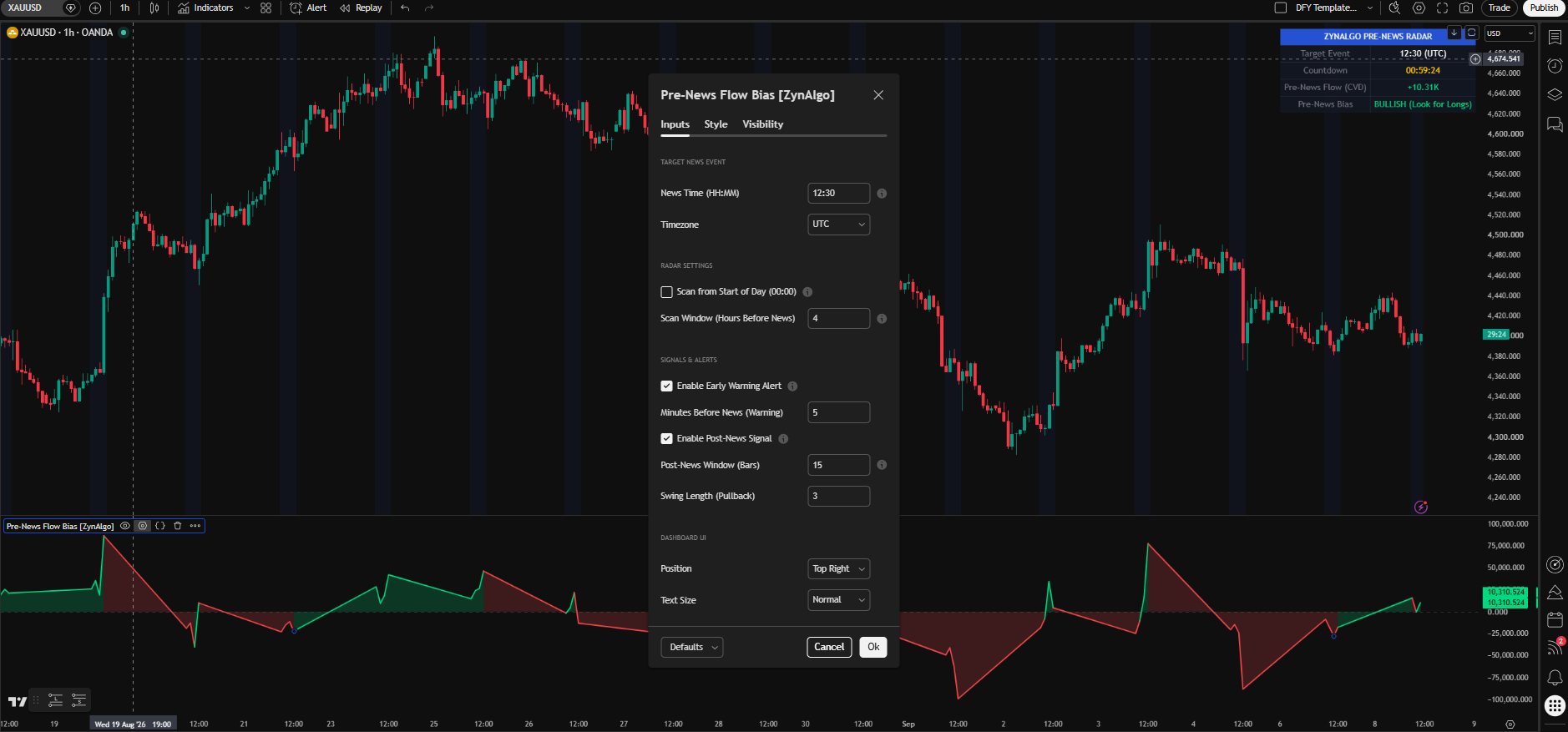
- Event clock: News Time (HH:MM) - the scheduled event time in 24h format - and Timezone set the target. The radar re-arms at that clock time every day - once today's time has passed it rolls forward to tomorrow - so update it when the event you are trading changes.
- Scan window: with Scan from Start of Day (00:00) switched off, the window opens Scan Window (Hours Before News) hours before the event (default 4) and closes at the news bar; switched on, accumulation starts at midnight in the chosen timezone instead.
- Estimated delta: each bar's volume is split by where the close sits in its high-low range - a close near the high counts mostly as buy volume, near the low mostly as sell volume, and a bar with no range splits 50/50. This is an estimate from candle data, not exchange bid/ask order flow.
- Pre-News CVD: the running sum of that delta, reset on the first bar of each scan window and accumulated only while the window is open. Its sign drives the pane colour and the dashboard bias.
- Bias lock: on the first bar at or after the news time, the CVD sign is stored as the locked bias - bullish above zero, bearish below zero, none at exactly zero - and stays fixed for the whole post-news window.
Entry rules with Pre-News Flow Bias
The indicator prints one kind of entry marker, and only after the release. Detection runs from the news bar for up to Post-News Window (Bars) bars (default 15), looking for a pullback against the locked bias that gets rejected, with Swing Length (Pullback) (default 3) defining the recent swing.
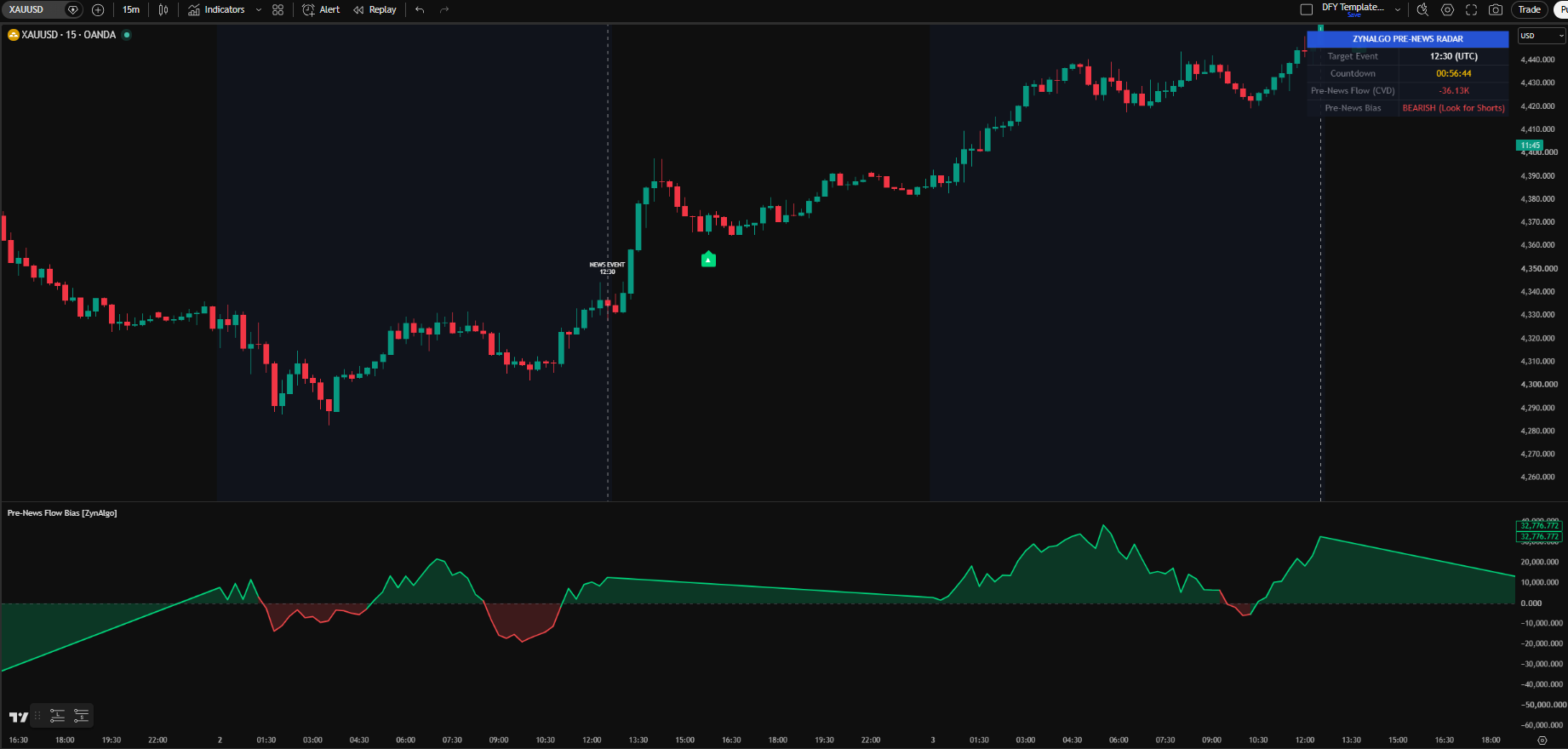
A ▲ BUY marker (green label below the bar) prints when all of these hold on a closed bar:
- Enable Post-News Signal is on and the post-news window is still open;
- the locked bias is bullish - the Pre-News CVD was above zero at the news bar;
- the bar's low reaches or breaks the lowest low of the previous Swing Length (Pullback) bars - a pullback into a recent low;
- the bar closes above its open - the sweep is rejected and price closes back up.
Hover the marker to read the reason: "Post-News Buy Signal - Pre-News CVD was Bullish".
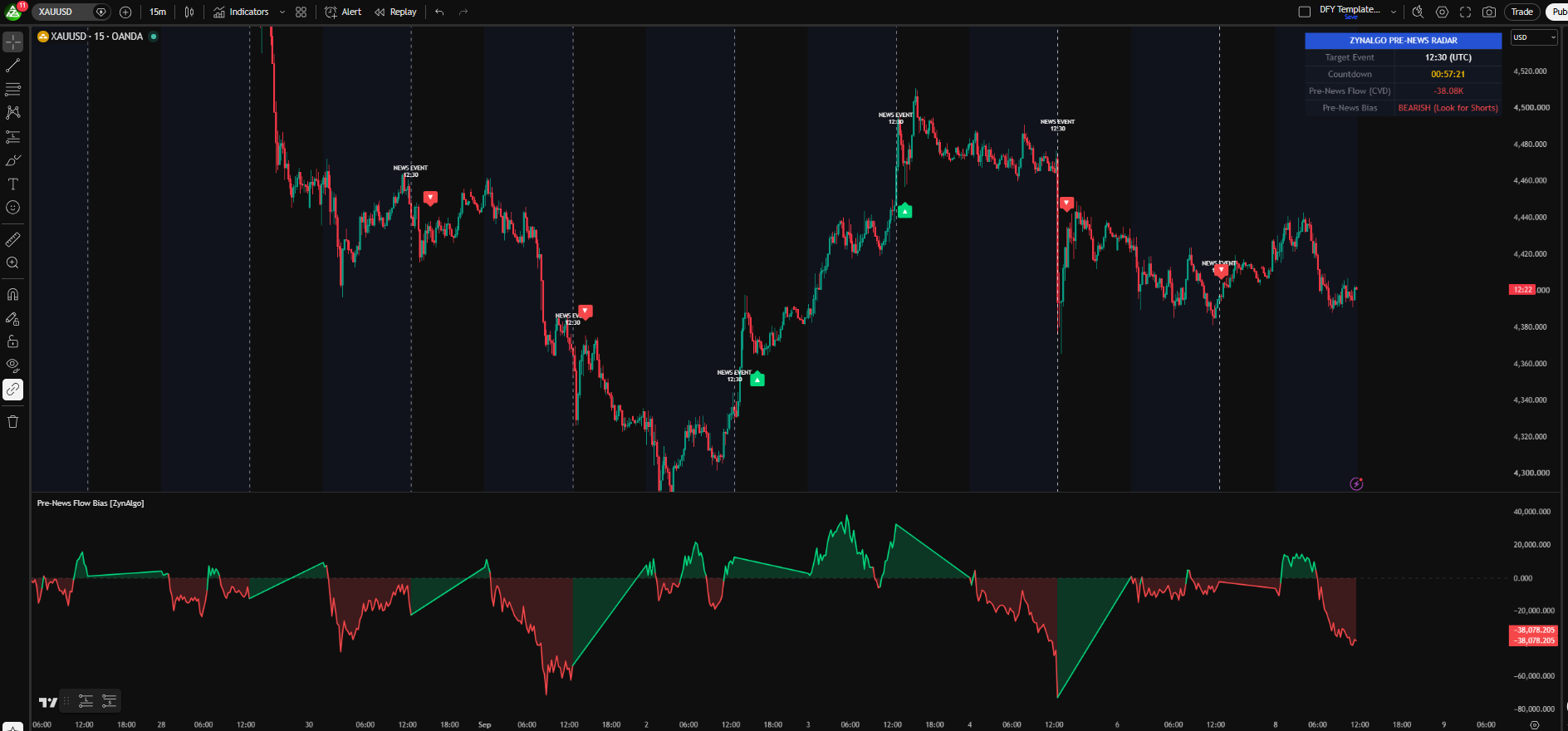
A ▼ SELL marker (red label above the bar) is the mirror image: the locked bias is bearish, the bar's high reaches or breaks the highest high of the previous Swing Length (Pullback) bars, and the bar closes below its open. Its hover text reads "Post-News Sell Signal - Pre-News CVD was Bearish". Only one marker can print per event - the first BUY or SELL closes the post-news window - and if no valid rejection appears before it expires, that release produces no signal. Markers are evaluated on confirmed bars, so nothing appears until the bar has closed. Two alerts are available: the early-warning alert fires Minutes Before News (Warning) minutes ahead of the event with the current CVD bias (create it with "Any alert() function call"), while "ZynAlgo: Post-News BUY Signal" and "ZynAlgo: Post-News SELL Signal" are selectable alert conditions tied to the markers.
Who should use Pre-News Flow Bias?
- Scheduled-event traders: you trade rate decisions, employment data, inflation prints or other timed releases and want the bias defined before the headline.
- Pullback traders who dislike chasing: the entry is a rejection of a recent swing in the locked direction, so you enter on the retrace rather than the first spike.
- Discipline-first traders: one marker per event and a countdown on screen keep you from stacking trades into the most volatile minutes.
- Intraday traders on markets with meaningful volume: the estimated delta needs volume data, and the timeframe should be short enough that the post-news window covers the reaction.
The news is the catalyst, not the signal. The edge is in reading which side was positioned before the release and taking one confirmed entry with that side afterwards.
Browse the ZynAlgo marketplace
Risk note: Pre-News Flow Bias [ZynAlgo] is a decision-support tool, not a trading system or financial advice. Buy and sell volume are estimated from candle data, signals can fail and no indicator removes market risk - always use your own stop placement and position sizing.
- Pre-News Flow Bias [ZynAlgo] v1Sep 17, 2026