Scalper Pro v4
More signals is not the same as more edge. Scalper Pro keeps its count low on purpose, marking a scalp only once trend, momentum, volume and structure agree.
Key benefits
- A score, not just an arrow - every setup is graded 0-100; anything below your minimum never prints
- Risk already measured - entry, ATR-based stop and up to three R-multiple targets arrive with the signal
- Quiet in a dead market - a sideway lock mutes signals while price is range-bound or the EMAs go flat
- No arguing with itself - an anti-flip filter blocks a reversal unless it scores materially higher than the last signal
- Your hours, not all hours - limit signals to Asia, London, New York, killzones or a custom window
How it works
Three setups can raise a signal: trend continuation, a reversal at a demand or supply pivot with RSI divergence, and a breakout retest. Each is scored on trend alignment, ADX, RSI, volume and higher-timeframe bias, and only the strongest qualifier prints - always on candle close. Full rule set in the Manual.
What's included
MetaTrader 4 indicator file (.ex4), with every threshold open in the Inputs tab.
Best for
Intraday scalpers on M5-M30 charts trading gold, indices, crypto and major FX pairs who want a rules-based filter rather than a constant stream of arrows.
Get access
Browse the ZynAlgo marketplace
Trading involves risk. This indicator is for educational purposes only and does not guarantee results.
Scalper Pro v4
What has to line up before Scalper Pro prints a signal
Scalper Pro is an intraday scalping indicator for MetaTrader 4. On a five-minute chart the shortage is never entries - it is entries worth the spread. The indicator is built around that distinction: it holds a signal back until several unrelated readings point the same way, and stays blank the rest of the time.
Every closed candle is measured against:
- Market structure - whether the recent swing highs and swing lows still support the direction
- Trend alignment - the order EMA 20, 50 and 200 are stacked in, and which side of EMA 20 the candle closed on
- Momentum - RSI 14 for the quality of the move, ADX for how much trend is behind it
- Participation - the candle's volume against its own 20-period average
- Range conditions - a sideway lock that mutes signals while the market is compressed or the EMA structure flattens out
Only when those agree does a BUY or SELL arrive, and it arrives complete: entry, stop loss and up to three take-profit levels already measured on the chart.
Signal Score explained
Most scalping tools treat every setup as equally valid. Scalper Pro grades them instead. Each raw setup is scored from 0 to 100, and that number decides whether it earns a place on your chart at all.
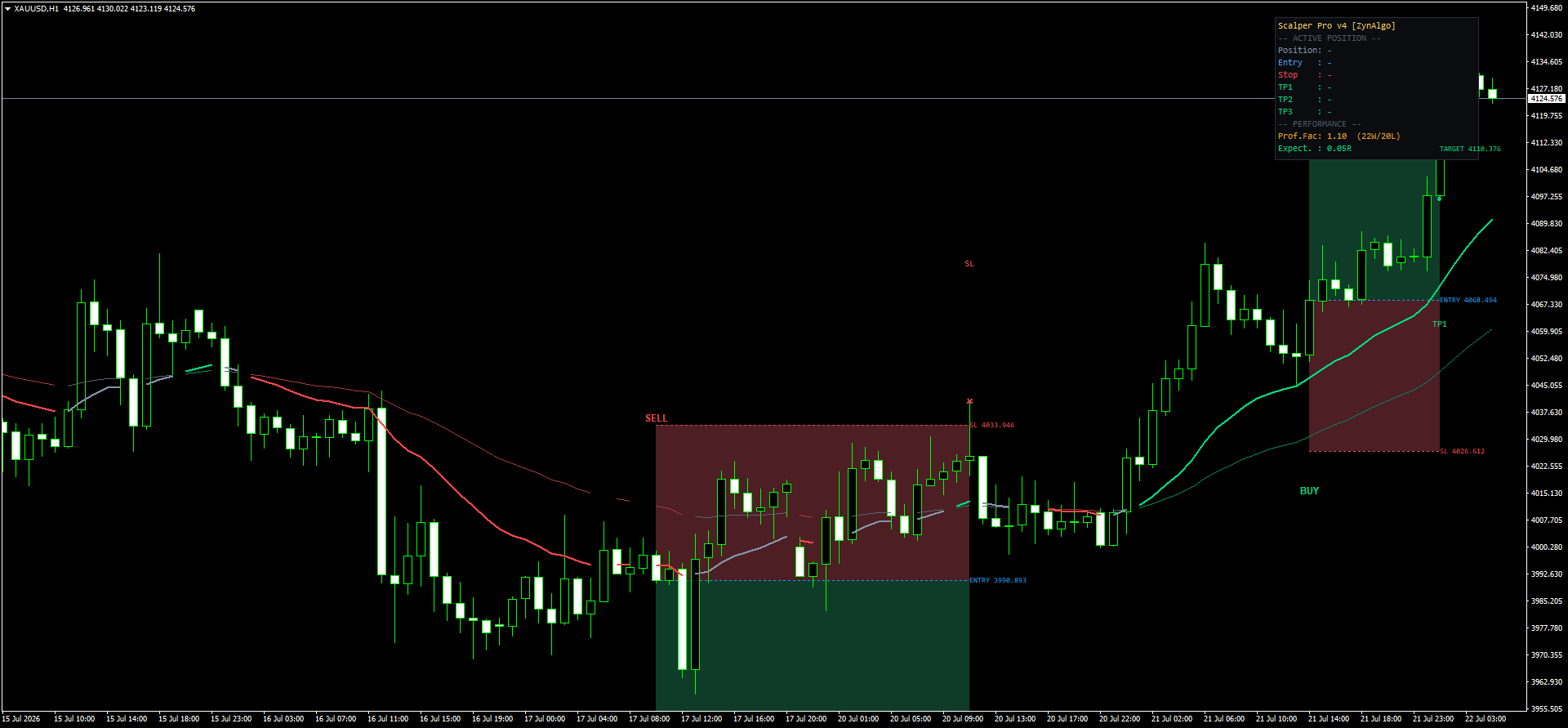
- A high score means several independent readings back the same direction
- A low score means the pattern formed, but nothing around it agrees
- Anything under the Minimum Score threshold (default 60) is discarded before it is ever drawn
The mistake this is built to prevent is a familiar one: a textbook pattern gets taken the moment it closes, without checking whether trend, momentum and volume support it. A clean engulfing candle inside a flat, low-ADX range is exactly the setup that looks right and behaves badly.
How the Signal Score is defined
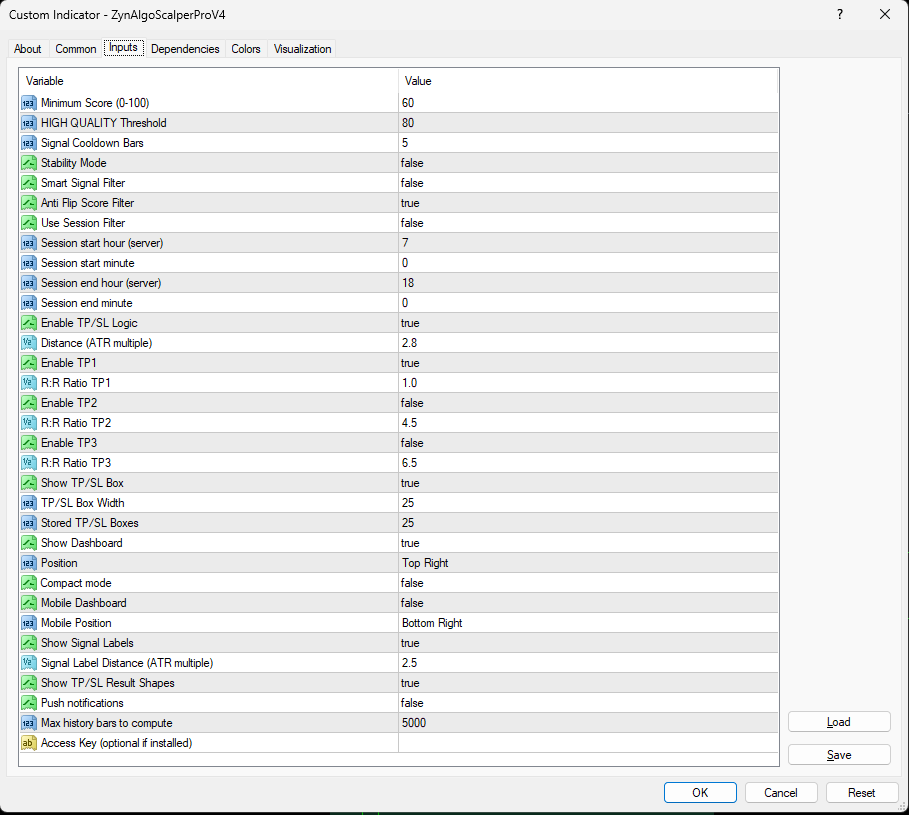
- Trend alignment - up to +20 when EMA 20/50/200 stack in order and price holds the correct side of EMA 20
- ADX - up to +20, scaled by trend strength (>=30 strongest, >=22 moderate, >=18 weak)
- RSI 14 - up to +20 when momentum sits in the working zone for that direction
- Volume - up to +15 when the candle trades above its 20-period average
- EMA 200 bias - +10 when the candle closes on the correct side
- Setup quality - up to +15 depending on how cleanly the triggering pattern formed
Three setups can raise a raw signal, and the highest-scoring one is the one that prints:
- C1 - trend continuation: EMA alignment, RSI in range, and an engulfing candle closing beyond the previous candle's extreme
- C2 - reversal: price reacting at a demand or supply pivot, with RSI divergence and a volume spike above 1.3x average
- C3 - breakout retest: a 20-bar range break, then a retest held within 0.5 ATR, confirmed by Stochastic
When trading opportunities appear
A BUY or SELL label appears only after the candle closes, and only when every gate below is open.
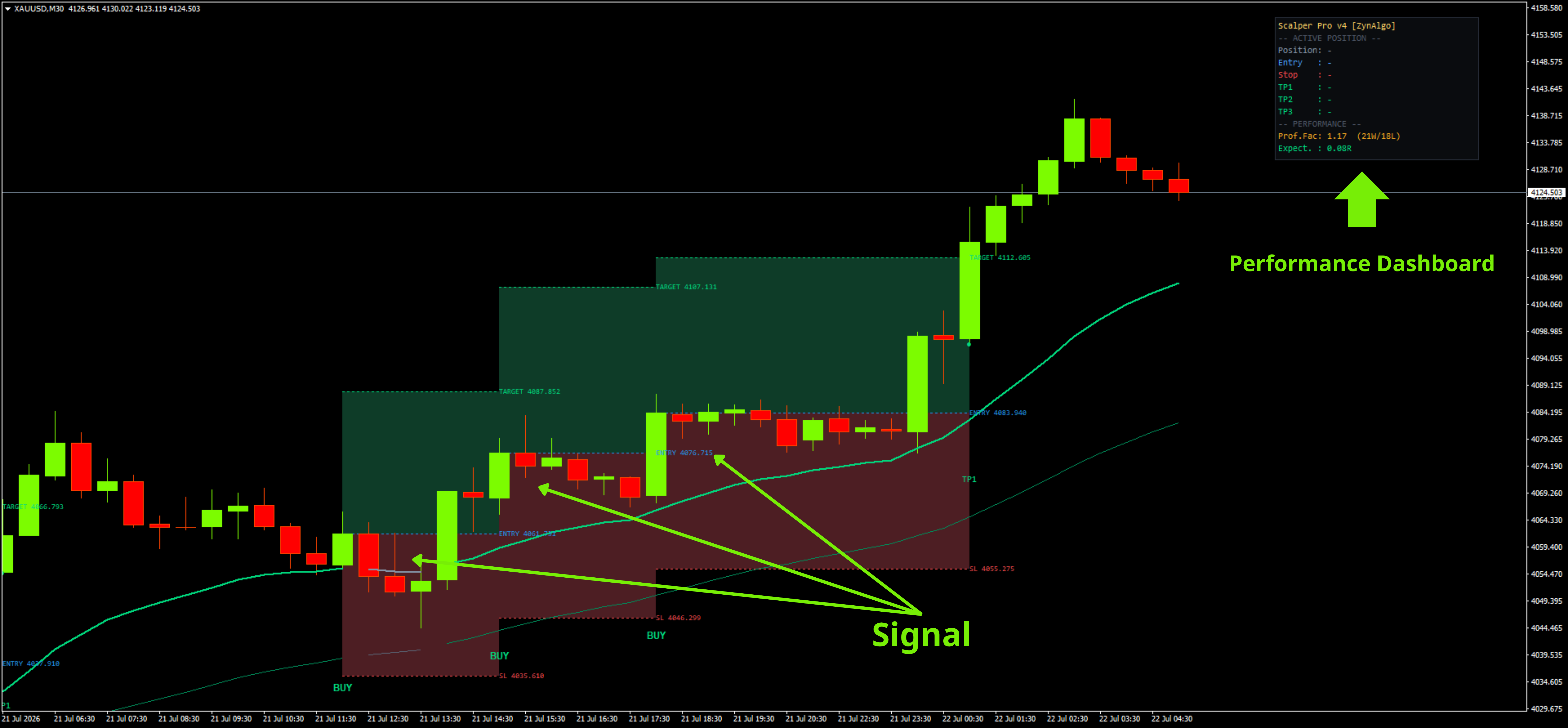
A BUY needs:
- The market is not in a sideway state
- Structure has printed a higher high or a higher low
- The best BUY score has reached the Minimum Score
- Cooldown is clear - 5 bars since the last BUY (default) and at least 3 bars since any signal
- The candle sits inside the selected session, if the session filter is on
A SELL needs the mirror image: bearish structure (a lower high or a lower low), price below the EMA structure, and the same score, cooldown and session gates.
When both directions qualify on the same candle, the higher score wins. The Anti-Flip Score Filter (on by default) is what stops the indicator arguing with itself: within 8 bars of a signal, an opposite signal has to beat the previous score by at least 12 points before it is allowed through.
Every accepted signal is drawn with:
- Entry at the close of the signal candle
- Stop Loss at ATR(14) x Distance (default 2.8)
- TP1 / TP2 / TP3 at configurable R multiples (defaults 1.0 / 4.5 / 6.5; only TP1 is enabled by default)
Session presets cover Asia, London, New York, London + New York, killzones and a custom window, all calculated against the timezone you select.
Is Scalper Pro right for you?
It fits you if:
- You scalp intraday and are comfortable working on M5 to M30 charts
- You would rather take four qualified entries than fourteen average ones
- You want the stop and the target attached to the signal, not decided afterwards
- You trade liquid instruments, mostly through the London and New York sessions
Tested ranges: XAUUSD M5-M15 - XAGUSD M5 - NAS100 M5 - BTCUSD M5-M15 - EURUSD M30 - AUDUSD M30. Index and crypto symbol names vary between brokers, so match the instrument rather than the exact ticker.
It fits you less well if you want constant activity or a signal on every swing. Scalping is not about catching every move - it is about being selective enough that the moves you do take pay for the ones you skip. Scalper Pro exists to enforce that selectivity while you are still watching the chart.
Installing it: copy the .ex4 file into the MQL4/Indicators folder inside your terminal's data folder, refresh the Navigator panel in MetaTrader 4, then drag Scalper Pro onto the chart. Every threshold above is editable in the Inputs tab.
Browse the ZynAlgo marketplace
This indicator is provided for educational purposes only and does not constitute financial advice. Trading involves risk; past performance does not guarantee future results.
- v1Jul 21, 2026
Initial release