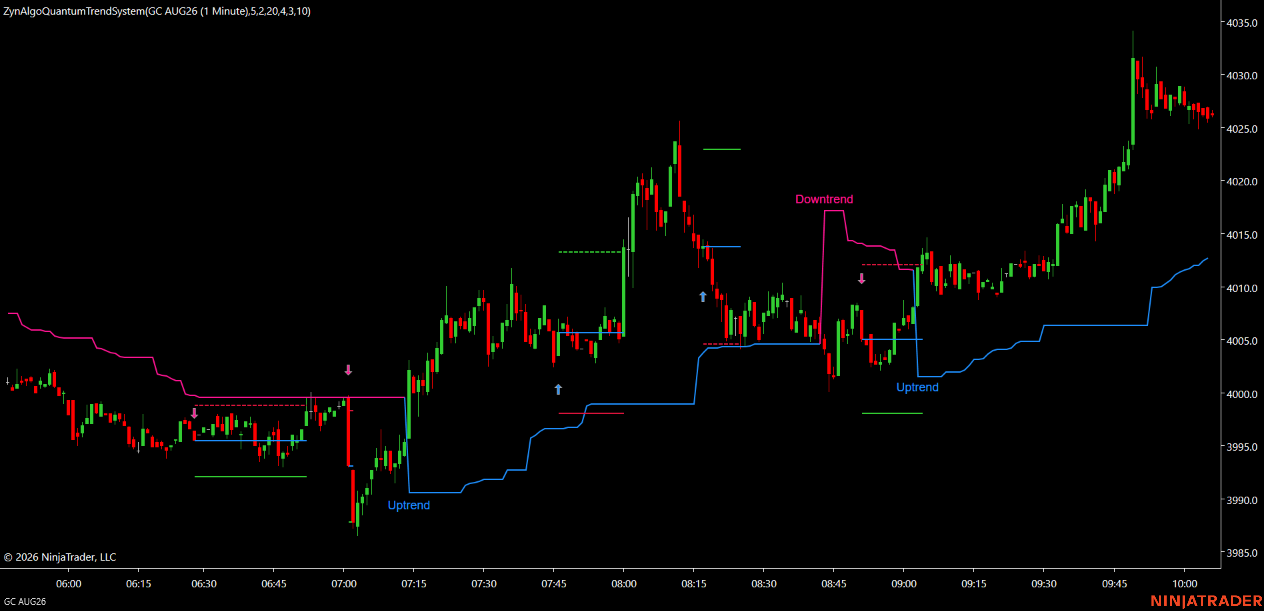
Trendline v5.0 Strategy
Trendline v5.0 Strategy is the automated version of the Trendline v5.0 indicator for NinjaTrader 8. It runs the exact same non-repainting signal engine you already see on the chart - four switchable modes, the Sensitivity and Signal Strength mapping, the range-based Sentiment Range MA, the shared cooldown and every entry filter - and then executes those signals for you as real NinjaTrader orders. With matching inputs the Strategy trades precisely the entries the indicator prints; nothing extra is invented.
Key benefits
- Trades the signals you already trust - the signal logic is identical to the Trendline v5.0 indicator, so every entry is one you could have seen and verified on the chart first.
- Hands-off execution - the Strategy evaluates each closed bar and, the moment a valid signal fires, submits the order group automatically on your NinjaTrader account.
- Position sizing your way - trade a fixed number of contracts, risk a fixed percentage of account equity against the stop, or size targets by custom tick distances.
- Structured multi-target exits - up to three take-profits (TP1/TP2/TP3) with configurable close percentages, plus a Simple mode that closes on the opposite signal.
- Automatic stop management - move the stop to breakeven after a chosen trigger and, optionally, trail the remaining position by fixed, stepped or percent methods.
- Built-in risk protection - optional maximum-drawdown, daily-profit and daily-loss limits pause new entries when your thresholds are hit.
- Selective by design - a session-time window, direction filter and single-position anti-stacking keep the Strategy from over-trading.
How it works
On every completed bar the Strategy replays the Trendline v5.0 engine, classifies the market with the Sentiment Range MA, and looks for a qualified entry in the active mode. When one appears it derives the entry, an ATR- or tick-based stop and up to three reward targets, sizes the position, and submits the order group tagged to the Strategy. Breakeven, optional trailing and anti-stacking are handled for you. Full rules and every input are in the Manual.
What's included
- NinjaTrader 8 automated Strategy (NinjaScript) licensed to your machine
- The same four signal modes, adjustable Sensitivity and Signal Strength as the indicator
- Fixed-quantity, risk-percent or custom-tick position sizing
- ATR or fixed-tick stop with up to three R-multiple or tick targets and partial closes
- Breakeven handling, optional trailing stop and optional equity-protection limits
- Full manual with the complete input reference and installation steps
Best for
FX majors, gold, index futures and large-cap crypto on M15 to H4 - for NinjaTrader 8 traders who want the Trendline v5.0 setups executed automatically with a defined stop, structured targets and disciplined risk.
Get started
Browse the ZynAlgo marketplace
Trading involves risk; no strategy predicts the market. Trendline v5.0 Strategy is an automated trading tool, not financial advice, and past performance does not guarantee future results.
Trendline v5.0 Strategy
NinjaTrader 8 - NinjaScript - automated strategy
What the Strategy actually does
Trendline v5.0 Strategy is the automated version of the Trendline v5.0 indicator for NinjaTrader 8. It is not a new set of rules bolted onto the indicator - it is the same signal engine, executing on your account. The four signal modes, the Sensitivity and Signal Strength mapping, the range-based Sentiment Range MA that colours the candles, the shared cooldown and every entry filter behave exactly as they do on the plain indicator. With matching inputs, the Strategy opens trades on exactly the signals you would see printed on the chart.
What the Strategy adds on top of the indicator's on-chart simulation is a real execution layer:
- Position sizing - a fixed contract quantity, a fixed percentage of equity risked against the stop, or custom tick-based sizing
- Up to three take-profits, each closing a configurable percentage of the position
- A Simple trading mode that instead runs a single target and closes on the opposite signal
- Stop-to-breakeven once a chosen trigger is reached, and an optional trailing stop
- Optional equity-protection limits (max drawdown, daily profit, daily loss)
- Anti-stacking, so only one position group is on at a time
Everything else - how a signal is defined, when it is allowed and when it is suppressed - works exactly as described in the Trendline v5.0 indicator manual.
How a signal becomes a trade
On every completed bar the Strategy re-derives the current signal from the Trendline v5.0 engine, non-repainting (the still-forming bar is excluded). When a valid entry fires on the most recently closed bar, the Strategy:
- Takes the entry at the market on the signal.
- Sets the stop from ATR(14) x the SL multiplier, or from a fixed tick distance, depending on the stop-loss mode.
- Derives each enabled target as an R-multiple of the stop distance (Advanced mode) or a tick distance (custom-tick mode).
- Sizes the total position from the sizing mode - fixed quantity, risk percent, or custom tick.
- Splits the position across the enabled targets by the TP close percentages.
- Submits the order group, respecting the direction filter and one-position anti-stacking.
While the group is live, the Strategy manages it: the stop moves to breakeven after the chosen trigger, an optional trailing stop advances the stop as price runs, and equity-protection limits (when enabled) pause new entries. A new group is only opened after the current one closes.
The four signal modes (shared with the indicator)
- Mode 4 (default) - mean-reversion. RSI reversal at the edge of the 50-bar range, only while the Sentiment Range MA is flat.
- Mode 1 - pullback onto a stacked EMA set (touch-and-confirm).
- Mode 2 - the bar three EMAs first stack in trend order.
- Mode 3 - a fast/slow crossover calculated on RSI.
The full definition of each mode, the Sentiment Range MA and the shared filters is in the Trendline v5.0 indicator manual. The Strategy trades them unchanged.
Inputs
Property names below match the Strategy settings exactly, grouped as they appear in NinjaTrader.
1. Basic Settings
- Sensitivity (default
5): Shifts the internal MA / RSI lengths. Lower is quieter, higher is more reactive (range 1-20). - Signal Strength (default
0): 0 uses the chart timeframe; higher values compute the signal on a proportionally higher timeframe for stronger confluence. - Indicator Mode (default
Mode4): Active signal engine: Mode1 / Mode2 / Mode3 (trend) or Mode4 (default range-reversal). - Enable BB Cloud (default
On): Toggles the Bollinger cloud overlay drawn by the underlying indicator.
2. Trading Mode
- Trading Mode (default
1 (Advanced)): 1 = Advanced multi-TP management; 2 = Simple (single target, close on the opposite signal). - Simple TP Ticks (default
50): In Simple mode, the take-profit distance in ticks (0 disables the fixed target).
3. Position Sizing
- Sizing Mode (default
FixedQuantity): How the position is sized: FixedQuantity, RiskPercent or CustomTick. - Fixed Quantity (default
1): Number of contracts in FixedQuantity mode. - Risk Percent (default
2.0): Percent of account equity risked on the stop distance, in RiskPercent mode. - SL Mode (default
ATR): Stop-loss basis: ATR (period x multiplier) or FixedTicks. - SL ATR Period (default
14): ATR period used for the stop in ATR mode. - SL ATR Multiplier (default
1.5): ATR multiplier that sets the stop distance in ATR mode. - SL Fixed Ticks (default
50): Stop distance in ticks when SL Mode is FixedTicks.
4. Take Profit
- TP1 R:R (default
1.5): TP1 reward-to-risk multiple (0 disables). - TP2 R:R (default
2.5): TP2 reward-to-risk multiple (0 = take all at TP1). - TP3 R:R (default
3.5): TP3 reward-to-risk multiple (0 = take all at TP2). - TP1 / TP2 / TP3 Ticks (default
50 / 100 / 150): Target distances in ticks, used in CustomTick mode. - TP1 / TP2 / TP3 Close % (default
33 / 33 / 34): Percentage of the position closed at each target.
5. Breakeven
- Enable BE (default
On): Move the stop to breakeven after the trigger is met. - BE Method (default
OnTP1): When to move to breakeven: ByTicks, OnTP1 or OnTP2. - BE After Ticks (default
20): In ByTicks mode, profit in ticks required before the stop moves to breakeven.
6. Trailing Stop
- Enable Trailing (default
Off): Enable the trailing stop. - Trailing Type (default
Fixed): Trailing method: Fixed, Step or Percent. - Trail Distance Ticks (default
20): Fixed trailing distance in ticks. - Step Size Ticks (default
10): Profit in ticks per trailing step (Step mode). - Step Distance Ticks (default
5): How far the stop advances per step, in ticks (Step mode). - Trail Start % (default
2.0): Start trailing only after this percent of profit (Percent mode). - Trail Distance % (default
1.0): Trailing distance as a percent of price (Percent mode).
7. Risk Protection
- Enable Equity Protection (default
Off): Enable the drawdown and daily limits below. - Max Drawdown % (default
10.0): Stop trading if account equity falls by this percent. - Daily Profit Limit (default
0): Stop new entries after this profit in account currency (0 disables). - Daily Loss Limit (default
0): Stop new entries after this loss in account currency (0 disables).
8. General
- Trade Direction (default
Both): Allow Both, LongOnly or ShortOnly entries. - Max Open Trades (default
1): Maximum concurrent position groups (anti-stacking). - Reverse Signal Logic (default
Off): Flip BUY and SELL signals.
9. Session Filter
- Use Session Filter (default
Off): Only allow new signals inside the trading window. - Session Time (default
0700-1800): The window used when the filter is on, format HHMM-HHMM (bar time); overnight windows are supported.
Position sizing and the target split
In FixedQuantity mode the Strategy trades the set number of contracts. In RiskPercent mode it divides the money at risk (equity x risk percent) by the loss-per-contract implied by the stop distance to size the group. In CustomTick mode the stop and targets come from your tick settings. The resulting quantity is split across the enabled targets by the TP close percentages (33 / 33 / 34 by default), so partial targets bank cleanly while the rest of the position keeps running.
Breakeven, trailing and anti-stacking
With Enable BE on, the stop moves to the entry price once the breakeven trigger is met (by ticks, after TP1, or after TP2). With Enable Trailing on, the remaining position's stop advances by the chosen trailing method as price moves in your favour. Anti-stacking is governed by Max Open Trades (default 1): while a position group tagged to this Strategy is open, no new group is opened even if a fresh signal fires, so one clean trade runs at a time.
Installing and running it
- In NinjaTrader 8, open the NinjaScript Editor and import the Strategy, or place the compiled Strategy so it appears under Strategies.
- Compile so the Strategy shows in the Strategies list.
- Open a chart on the instrument and timeframe you want to trade (M15-H4 suits the default settings) and add the Strategy from the Strategies tab, or run it from the Control Center.
- Set your sizing mode, risk and signal mode, then enable the Strategy.
- Confirm the account and that the Strategy is enabled so it can place orders.
License
Trendline v5.0 Strategy is licensed through NinjaTrader's vendor licensing (NinjaTrader Vendor License). Access is tied to your NinjaTrader machine ID registered with ZynAlgo - there is no access key to type in. If your machine is not licensed, NinjaTrader will not allow the Strategy to run.
Browse the ZynAlgo marketplace
Trading involves risk. Trendline v5.0 Strategy is an automated trading tool, not financial advice, and past behaviour does not predict future results. Always test on a simulation account first.
- Trendline v1Aug 13, 2026