MTF Command Center
Checking six timeframes shouldn't mean six chart tabs. ZynAlgo MTF Command Center is a multi-timeframe dashboard for NinjaTrader 8 that runs one structure engine across seven timeframes and reports it in one panel.
Key benefits
- One glance instead of seven charts - 15M through Weekly rows, plus an optional Monthly, in one live table.
- A bias you control - every timeframe carries its own weight, so higher ones can outvote lower ones.
- Location before entry - the table flags the moment price reaches the nearest order block or fair value gap.
- Context in the same panel - session, killzone and relative volume sit right under the timeframe rows.
- Honest about disagreement - when timeframes conflict the score reads CHOP instead of a direction.
How it works
Each enabled timeframe is scored on structure, order block and fair value gap proximity, swing position and, optionally, EMA trend. Votes are weighted and normalised into one bias score, while zones, previous day/week levels and bias bar colouring are drawn on the chart. The Manual walks through the table column by column.
What's included / Platforms
NinjaTrader 8 indicator (NinjaScript), delivered for installation in NinjaTrader 8 with licensed indicator access. Includes the dashboard, order block and FVG boxes, previous day/week levels and bias bar painting.
Best for
FX, gold, indices and crypto, intraday to swing. Built for top-down and SMC/ICT-style traders who want confirmation before a manual entry - it produces no automated signals or alerts.
Get started
Browse the ZynAlgo marketplace
Trading involves risk: this is an analysis tool, not financial advice.
MTF Command Center
Why one panel instead of seven charts
ZynAlgo MTF Command Center is not a signal generator. It is a read-out desk: it runs the same structure engine on up to seven timeframes at once and prints the result as one compact table on your chart, so a full top-down review happens in a single glance instead of seven chart tabs.
On every enabled timeframe the tool keeps track of five things:
- Market structure - the sequence of pivot highs and lows (HH, HL, LH, LL) that decides whether that timeframe is building up, down, or going nowhere.
- Order blocks - the last opposing candle before a pivot break, kept alive until price closes through it.
- Fair value gaps - three-bar imbalances, dropped from the list the moment price fills them.
- Swing position - where price sits inside the latest swing high/low range, including sweeps and reclaims.
- EMA 9 distance - how far price has stretched from its short-term mean, displayed in percent, price or pips.
All of it is compressed into one weighted bias reading plus a context line - session, killzone and relative volume - inside a single NinjaTrader 8 panel, so you can see immediately whether the timeframe you trade is working with the rest of the chart or against it.
How ZynAlgo MTF Command Center reads multi-timeframe agreement
The heart of the tool is the Weighted Bias Score - one number answering "how much of this chart actually agrees right now?". Every enabled timeframe casts a directional vote for each analysis factor, each vote is multiplied by that timeframe's own weight, and the total is measured against the maximum score the enabled timeframes could produce. The result appears as +X/Y in the context row and sets the colour of your candles.
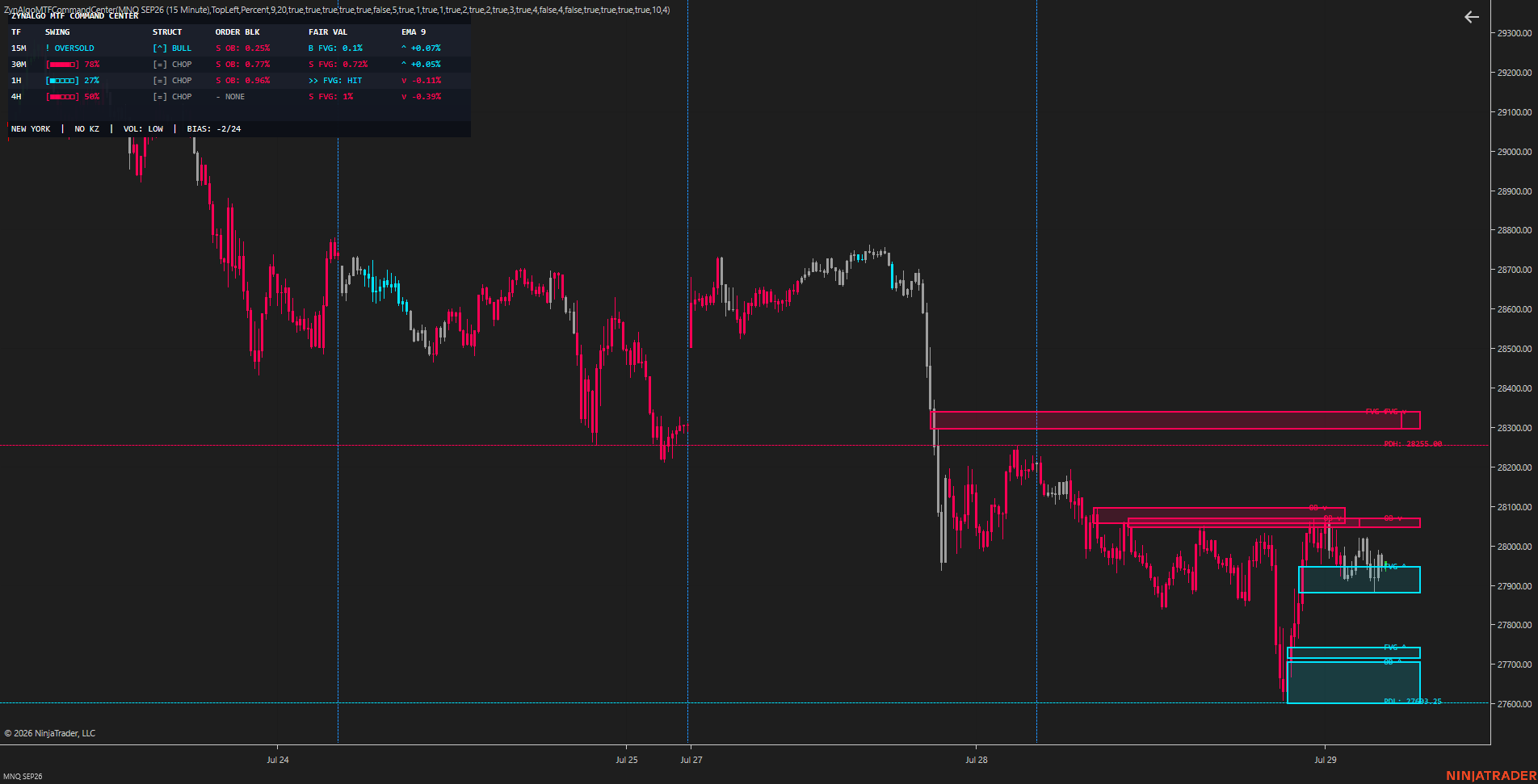
- Six timeframes by default - 15M, 30M, 1H, 4H, Daily and Weekly are on out of the box; a seventh Monthly slot ships disabled. All seven are free timeframe inputs.
- Higher timeframes speak louder - default weights are 1 for 15M and 30M, 2 for 1H and 4H, 3 for Daily, 4 for Weekly and Monthly - and every weight is adjustable from 0 to 10.
- Rows that do not apply disappear - a timeframe lower than your chart timeframe is hidden automatically, so a Daily chart never shows you a 15M row.
- Three readable states - above +20% the score reads BULL, below -20% BEAR, everything in between CHOP - and with bar painting on, the candles carry the same colour.
The classic mistake is judging a market from the one row you trade. A textbook 15M continuation and a Weekly row parked at the top of its swing range describe the same market; alone, the first looks like an entry and the second explains why it fails. The score exists so that disagreement is visible before the order, not after it.
How the Weighted Bias Score is defined
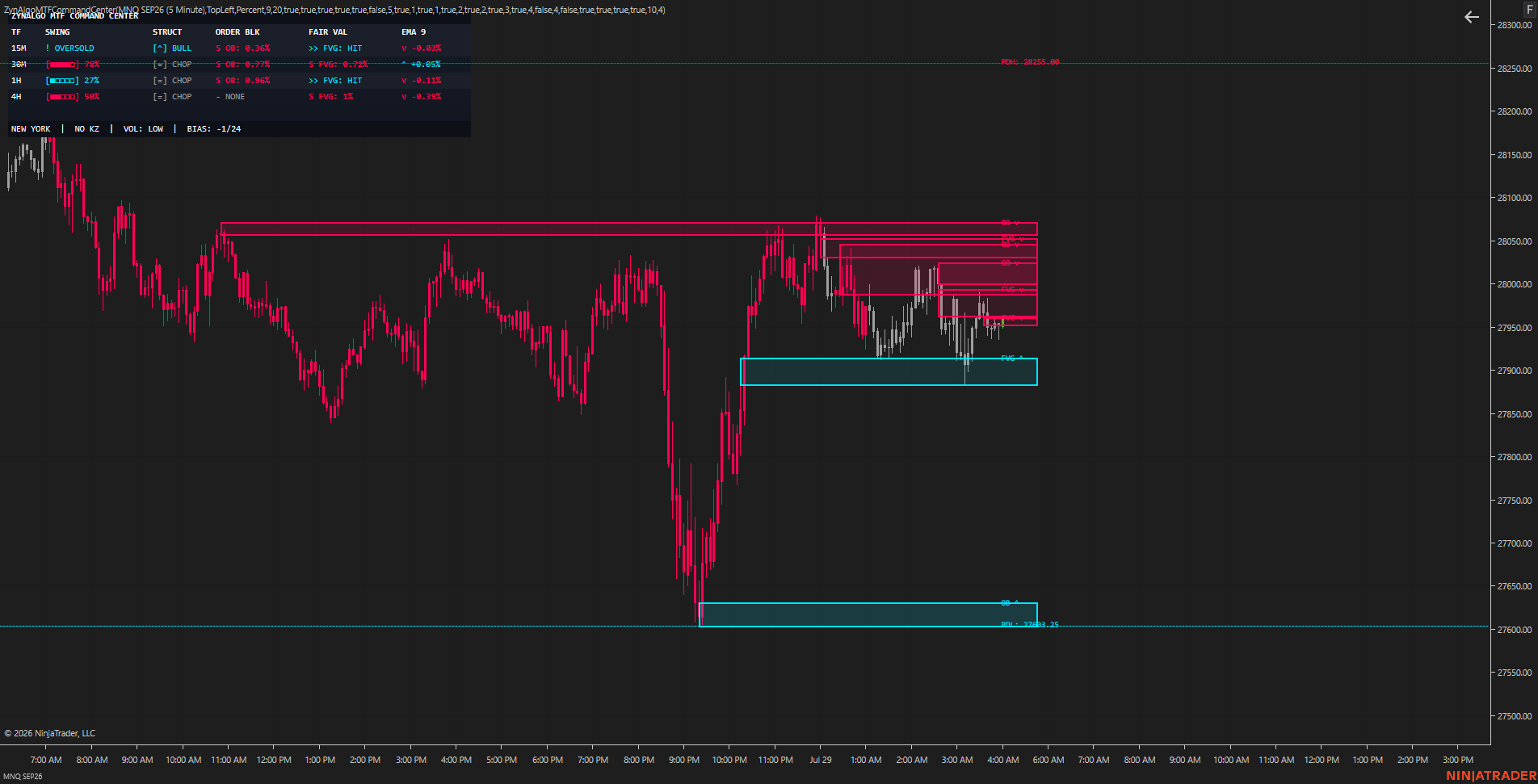
- Structure bias - votes +1 only when the last high and the last low are both higher, -1 when both are lower, 0 otherwise. The cell prints [▲] BULL, [▼] BEAR or [■] CHOP, and its tooltip lists the last three structure points, e.g. HL-HH-HL.
- Order block proximity - the nearest unmitigated block votes with its direction. The cell shows 🎯 OB: HIT once price has reached the zone, otherwise the remaining distance.
- Fair value gap proximity - the same logic applied to the nearest unfilled gap, reported in the FAIR VAL column.
- Swing position - the lower 30% of the swing range votes bullish, the upper 30% bearish, the middle stays neutral; once price trades outside the range the vote follows the break.
- EMA trend - disabled by default. Switched on, every timeframe adds a vote for price sitting above or below its EMA 9.
- Timeframe weight - multiplies every vote coming from that row, so you decide how much louder the Weekly is than the 15M.
- Normalisation - the maximum score counts only the factors you left enabled, on the timeframes actually displayed - turning a factor or a timeframe off rescales the reading instead of skewing it.
When to act (and when not to)
ZynAlgo MTF Command Center prints no buy or sell arrows and fires no alerts. It hands you the evidence and leaves the entry to your own plan, so reading it follows a fixed order:
- Read the context row at the bottom of the panel: 🌐 session | ⏳ killzone | ⚡ VOL | 🎯 BIAS. The bias score is your directional permission slip.
- Check whether the higher-timeframe rows - Daily and Weekly - show a STRUCT direction that matches the score. Agreement means the idea you are about to take runs with the chart, not against it.
- Look for a location on the timeframe you actually trade: 🎯 OB: HIT or 🎯 FVG: HIT means price has arrived at the nearest zone; a percentage means it is still that far away.
- Use the SWING cell as a timing filter. OVERSOLD and OVERBOUGHT mark price outside the swing range or a sweep-and-reclaim, and the tooltip spells the reason out, e.g. "Sweep & Reclaim Low on 4H".
- Only then apply your own trigger, stop and target, using the boxes and levels the tool has drawn.
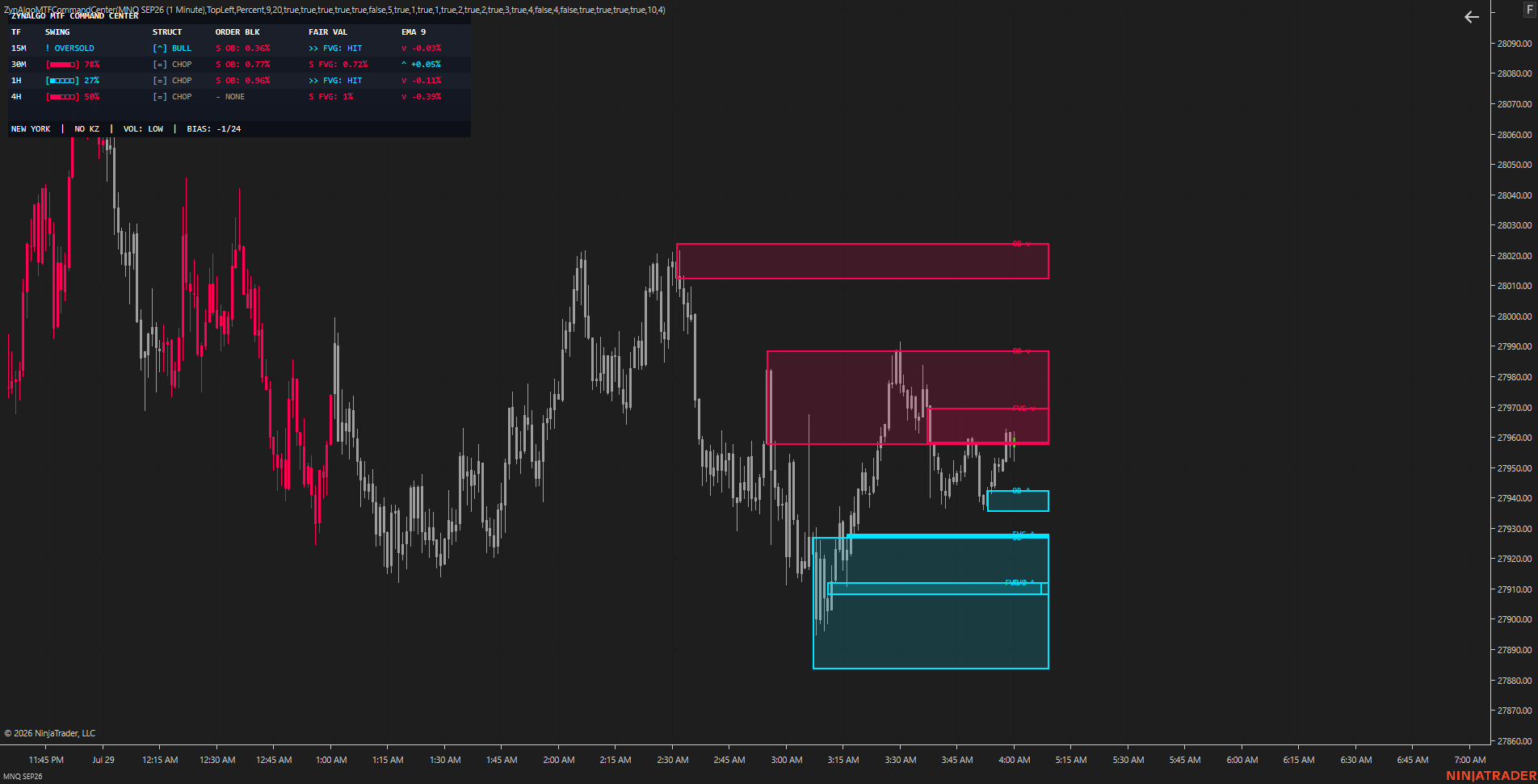
- Aligned - bias reads BULL or BEAR, Daily and Weekly STRUCT agree with it, and price is at an OB: HIT or FVG: HIT in the same direction - the highest-agreement picture the table can show.
- Extended - bias is directional but the SWING cell of your timeframe already reads OVERBOUGHT (or OVERSOLD against you): the move is late, and waiting for a pullback into a zone costs nothing.
- Chop - score inside +/-20%, rows contradicting each other, most zone cells showing ∅ NONE. Nothing to act on - this is the state the table is best at exposing.
- Thin context - ⚡ VOL: LOW together with ⏳ NO KZ. The reading is technically valid, but the participation behind it is not.
On the chart itself the tool draws only what the table refers to: shaded order block boxes tagged OB ▲ / OB ▼, dashed fair value gap boxes tagged FVG ▲ / FVG ▼ - the last four of each by default - plus the previous day's high and low, and optionally the previous week's, as labelled reference lines.
Who benefits most from ZynAlgo MTF Command Center
- Top-down traders - who already build a higher-timeframe bias before dropping to an execution chart. This replaces the tab-switching, not the method.
- Structure and zone traders - working in SMC/ICT style with order blocks, fair value gaps, liquidity sweeps and previous day/week levels.
- Intraday and swing traders - on liquid instruments - FX, gold, indices, crypto - where session and killzone context changes how a level behaves.
- Discretionary traders - who want confirmation before a manual entry rather than a feed of automated signals.
It is a poor fit for anyone looking for automated entries or alerts: the tool deliberately produces neither. Confluence works by subtraction, not addition - the real value of a command centre is the number of trades it talks you out of on the days the chart does not agree with itself.
Browse the ZynAlgo marketplace
ZynAlgo MTF Command Center is an analysis tool, not financial advice. It reports what the chart is showing and cannot predict future prices; trading carries risk, and position sizing and risk management remain yours.
- MTF Command Center v1Jul 21, 2026
Initial release
Why MTF Command Center Stops You Trading Against Your Own Chart
Most reversals happen because the 15-minute setup looked perfect but the Daily was already extended. MTF Command Center solves multi-timeframe review by putting seven timeframes into one weighted-bias panel.
Why My Multi-Timeframe Analysis Takes Too Long (and How to Fix It)
Switching between seven chart tabs to check structure, order blocks, and fair value gaps on every timeframe eats minutes you don't have. By the time you're done, the setup is gone.