NR Engine
Every session leaves a range behind, and the tightest ones are the ones worth watching. NR Engine [ZynAlgo] tracks each completed session on your NinjaTrader 8 chart, flags the ones that print the narrowest range in the recent count - the NR4 and NR7 coils - and marks the break that finally lets the pressure out. You stop hunting for the setup by eye and start reacting to a framed range with a clear BUY or SELL call.
Key benefits
- Session coils found for you: the engine measures each finished session's range and flags NR4 and NR7 compression automatically.
- Filtered breaks, not raw noise: a macro trend filter and an anti-chop retest check stand between a boundary poke and a printed signal.
- A single directional call: a BUY or SELL label prints on the confirmed break, so the intended side is never in doubt.
How it works
NR Engine measures the high-to-low range of each completed session and compares it with the previous sessions to flag the narrowest as a coil. It frames that range with a ceiling, a floor and a median line, then waits for a close beyond the boundary that agrees with the trend filter. An optional retest check holds the signal until price re-tags the edge and continues, cutting the false breaks of choppy conditions. Full walkthrough in the Manual.
What's included / Platforms
- NinjaTrader 8 indicator (NinjaScript), added to your account once access is granted. Released to ZynAlgo VIP members.
Best for
Futures and intraday breakout traders who want to trade the expansion out of quiet sessions, with the coil detection and the entry timing handled on the chart.
Get started
Browse the ZynAlgo marketplace
Disclaimer: not financial advice or a guaranteed signal service. Breakout signals can fail and no indicator removes market risk - trade with your own plan and position sizing.
NR Engine
What NR Engine brings to NinjaTrader 8
NR Engine [ZynAlgo] does one job: it watches each completed session for a volatility coil and marks the break that releases it. As every session closes, it measures that session's range and compares it with the recent sessions to find the two classic narrow-range patterns - NR4 and NR7. When one qualifies, it frames the range on your NinjaTrader 8 chart and prints a single BUY or SELL label the moment price closes through the boundary with confirmation. It is a signal tool: it hands you the direction and the timing of the break, so you trade the expansion instead of chasing it.
The philosophy is simple. Markets breathe in and out - quiet sessions contract, active sessions expand. When a session prints the narrowest range of the recent count, participation has dried up and orders are stacking on both sides of a tight box. The move that breaks that box tends to run, because it is the release of pressure that has been coiling. NR Engine automates the two hard parts: catching the coil the moment the session closes, and waiting until the break truly commits.
The narrow-range coil
The core concept is the narrow-range coil: a completed session whose high-to-low range is the smallest of its recent lookback, drawn as a boundary box you can trade against. A tight session on its own is easy to overlook. Framed as a range with a defined ceiling, floor and median, it becomes a level structure with two clear edges - and a break of either edge becomes a decision you can act on.
Why it matters: without the box, a breakout is just a bar poking out of a cluster. With the box, you know exactly which price is the trigger, which side the trend favours, and where the retest should hold. That is the difference between a guess and a plan.
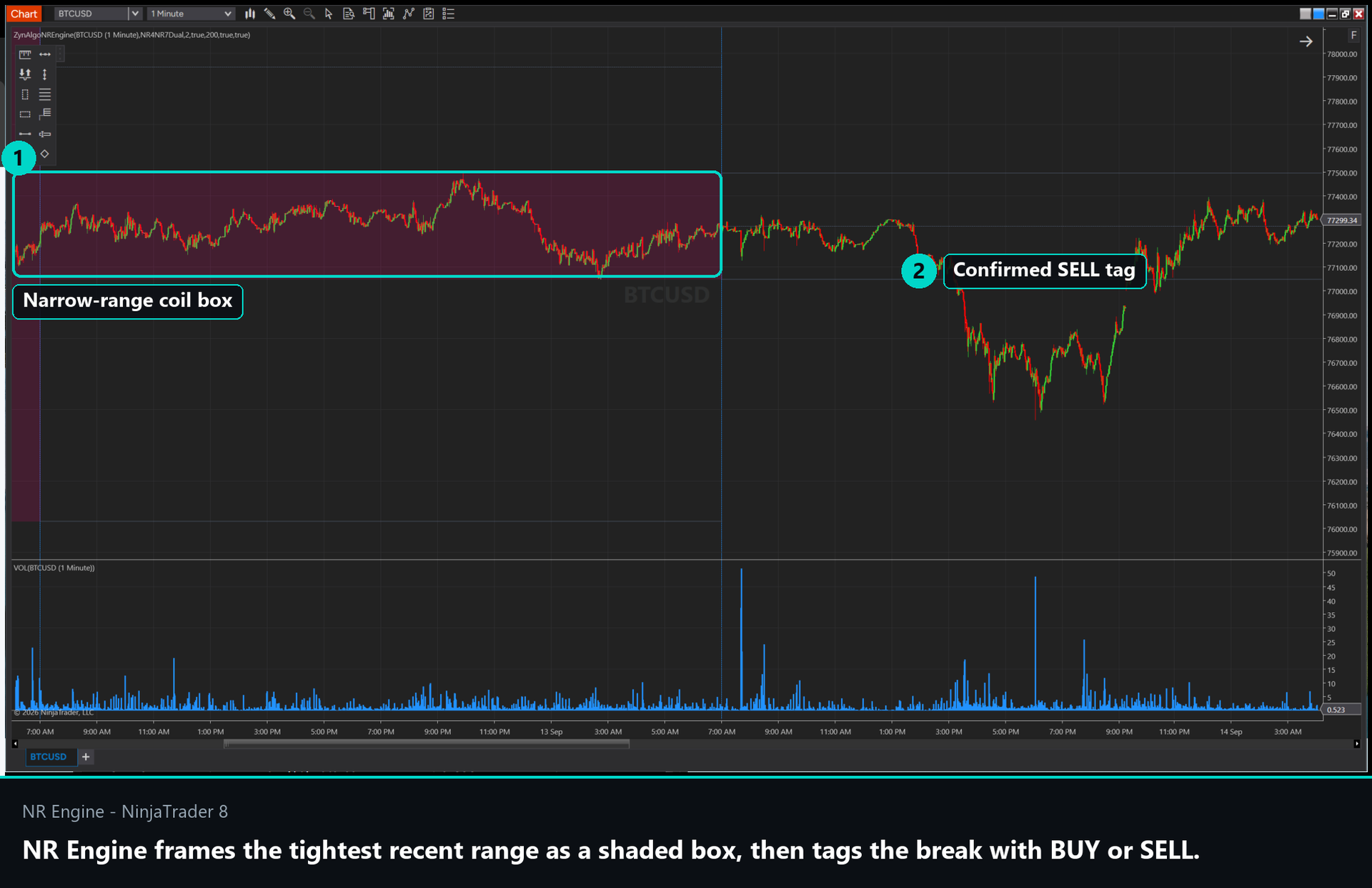
What a live coil looks like on the chart:
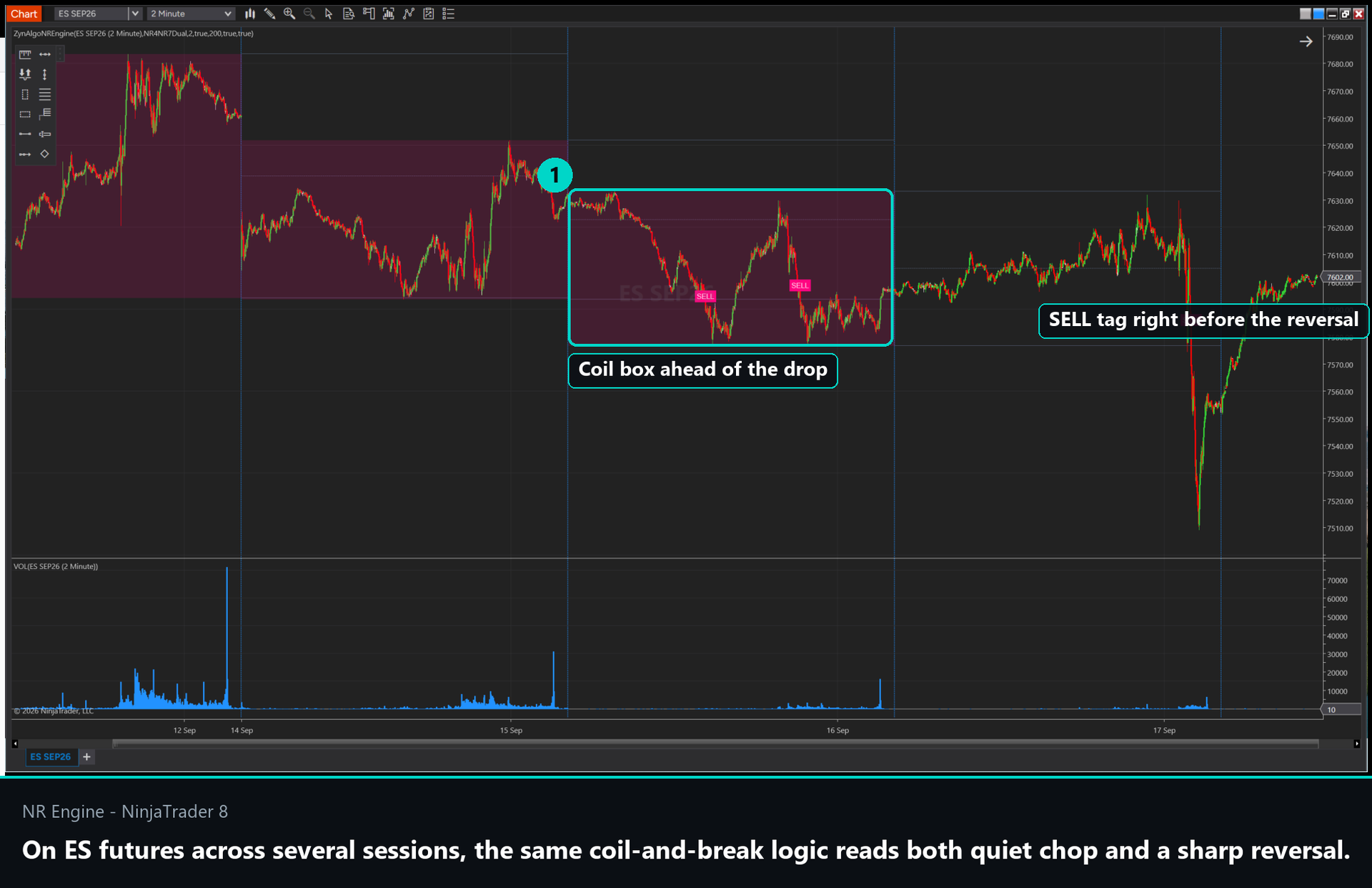
- a shaded rectangle spanning the high and low of the qualifying narrow-range session, coloured by pattern - cyan for NR4, pink for NR7;
- a solid ceiling line at the range high and a solid floor line at the range low;
- a dashed median line at the midpoint of the range;
- the box and lines carried forward on the active range until a break resolves it.
Common mistake: treating every quiet session as a trade. A coil is only a setup once price breaks its edge in agreement with the trend filter - the box is the context, not the entry.
How the narrow-range coil is defined
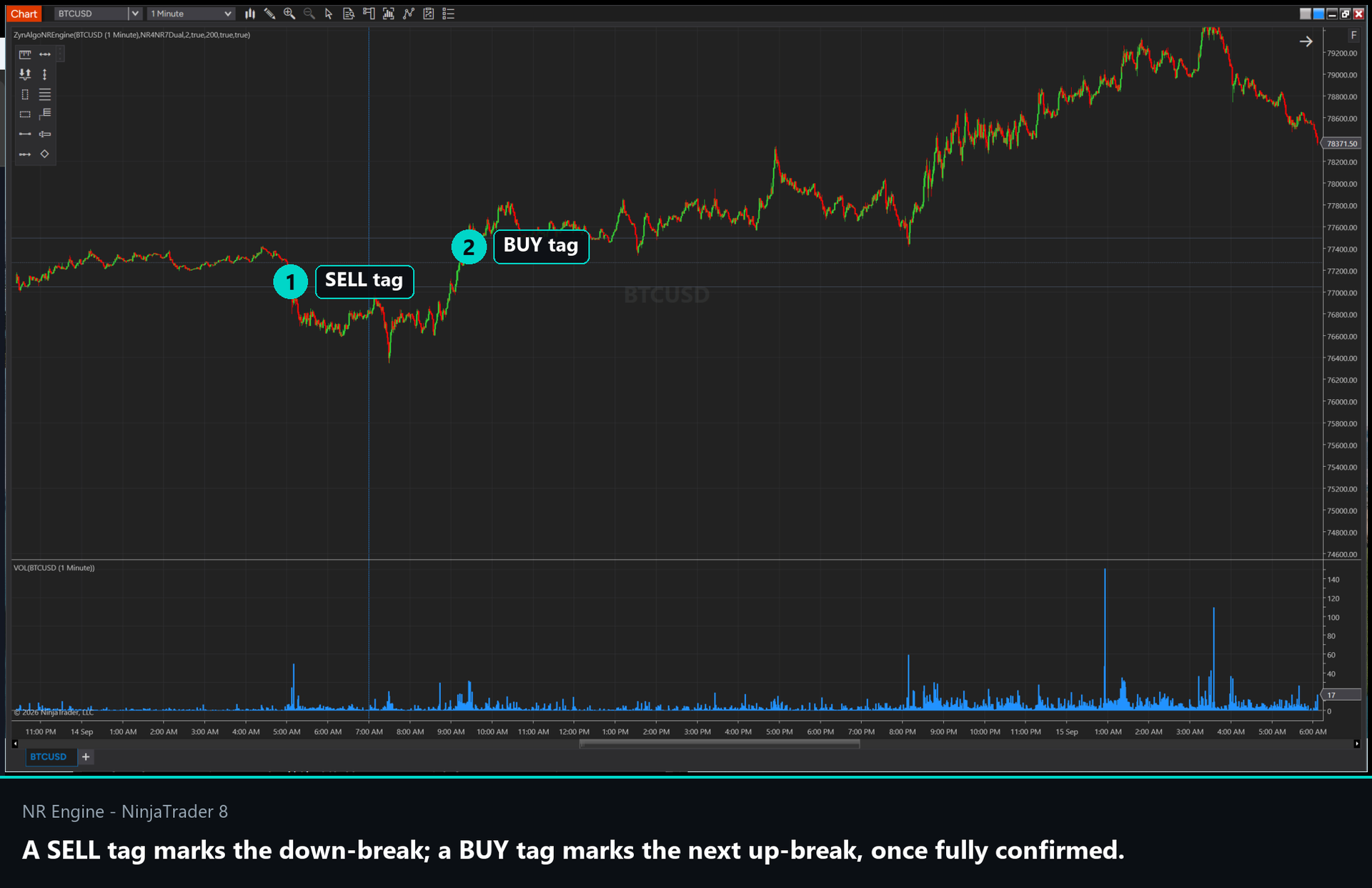
- Volatility scanner: each completed session's range is compared with the recent session history to test for the narrowest range over the last 4 sessions (NR4) and last 7 sessions (NR7). You choose Dual, NR4 Only, or NR7 Only via Matrix Evaluation Mode. When both qualify, NR7 takes priority as the tighter, rarer coil.
- Range box: the qualifying session's high and low become the ceiling and floor, and their average becomes the median. These three levels are the framework every break is measured against.
- Macro trend filter: an EMA of your chosen length (default 200) defines the higher-order trend. When active, only breaks that agree with it are allowed - up-breaks require price above the EMA, down-breaks require price below it.
- Retest verification (anti-chop): an optional filter that holds a raw break for a set number of bars and only confirms it once price re-tags the boundary edge and continues in the break direction, removing the sawtooth false breaks of choppy markets.
- Signal label: once a break is confirmed, a cyan BUY label prints below the bar or a pink SELL label prints above it.
How to trade the break
NR Engine gives you a direction and a moment, not a full trade plan - the stop, target and size stay with you. The label prints only when the sequence below completes, which is what keeps it selective.
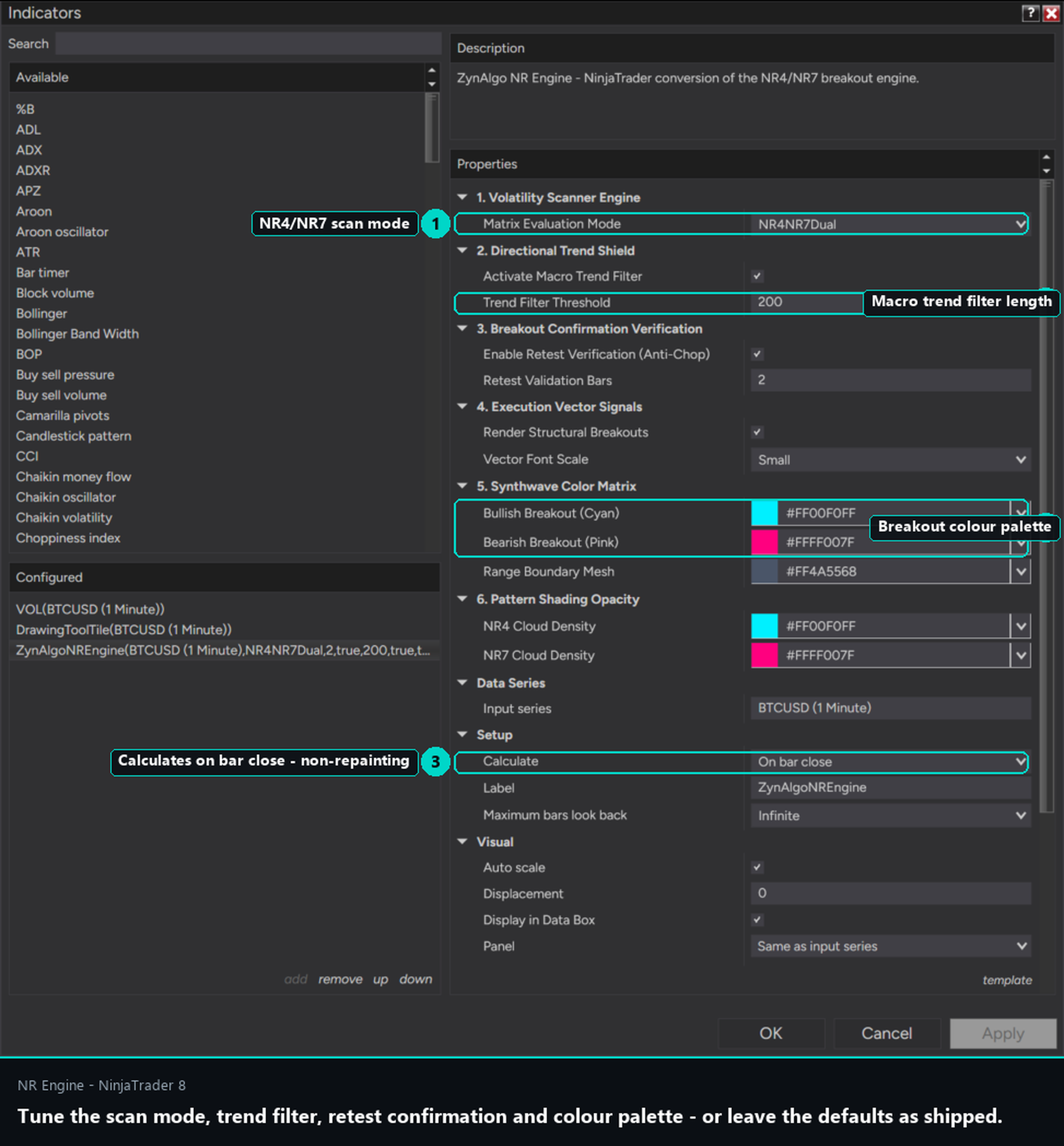
The rules a signal has to pass before it prints:
- Coil in place - the last completed session qualifies as NR4 or NR7, so a boundary box exists on the chart.
- Boundary break - price closes above the ceiling for a long, or below the floor for a short. A reset gate makes sure price has first pulled back through the median, so you are trading a genuine break of the range and not a bar that was already outside it.
- Trend agreement - with the macro filter on, the break must align with the EMA trend, so you are not fading the higher-order direction.
- Retest holds - with the anti-chop filter on, price must return to tag the broken edge and then continue, confirming the break has support.
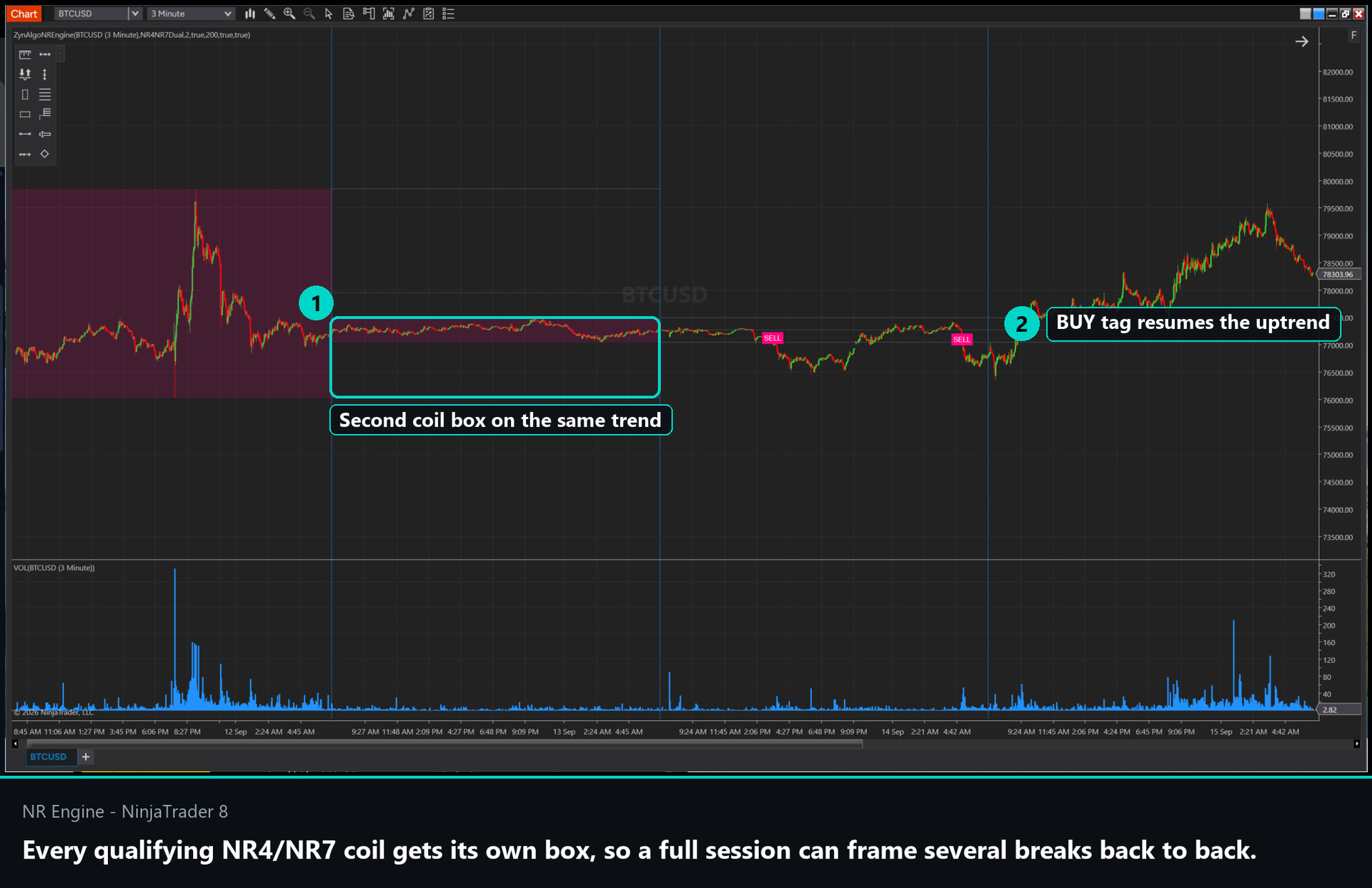
How to read the label in practice:
- a cyan BUY label means an NR coil broke to the upside with trend and retest confirmation - the intended play is a long in the break direction;
- a pink SELL label means the coil broke down under the same conditions - the intended play is a short;
- the median line is your invalidation reference: a break that snaps back through the median has failed its premise, whatever your stop rule;
- if you prefer fewer, cleaner breaks, keep the retest filter on; if you want the earliest possible entry, turn it off and take the raw boundary break.
Who NR Engine is for
- Futures breakout traders: you want to be positioned the moment a quiet session expands, and you want the coil found for you rather than eyeballed.
- Swing traders working session ranges: the session-based scan frames NR4/NR7 setups from completed sessions, giving you a handful of high-quality breaks rather than constant noise.
- Momentum traders who hate chop: the trend filter and retest check exist precisely to keep you out of the sideways markets where breakout systems bleed.
- Discretionary traders who want structure: the box, the median and the label give you a repeatable framework to build your own entries and stops around.
A breakout signal is a starting point, never a promise. The value is in trading the coils that clear every filter and passing on the ones that do not, then managing the trade with your own risk rules.
Browse the ZynAlgo marketplace
Risk note: NR Engine [ZynAlgo] identifies breakout signals but does not place trades or guarantee outcomes. Breakouts can fail and reverse - always use your own stop, target and position sizing.
- NR Engine v1Sep 18, 2026