Why Some Support Levels Hold and Others Fail on Your Chart

You mark a horizontal line at the low of a swing that reversed hard three weeks ago. Price taps it again this week, and for a second it looks like the same reaction is coming. Then it doesn't. The candle closes straight through the line, your stop is gone, and you are left wondering why some support levels hold and others fail, when they looked identical on the chart before the trade.
The usual fix is to add more lines: yesterday's low, last month's low, a round number nearby. That just gives you more places to be wrong. The real difference between the level that held and the one that didn't was never visible on a plain candlestick chart, because a horizontal line only marks a price. It says nothing about how long the market actually sat there.
Why some support levels hold and others fail

A single touch is not the same as a level the market remembers. When a swing leg forms, most of it gets crossed quickly, but somewhere inside that leg price often stalls and leaves a dense cluster of bars behind. That cluster, not the single low or high of the move, is the part of the leg that tends to matter again later.
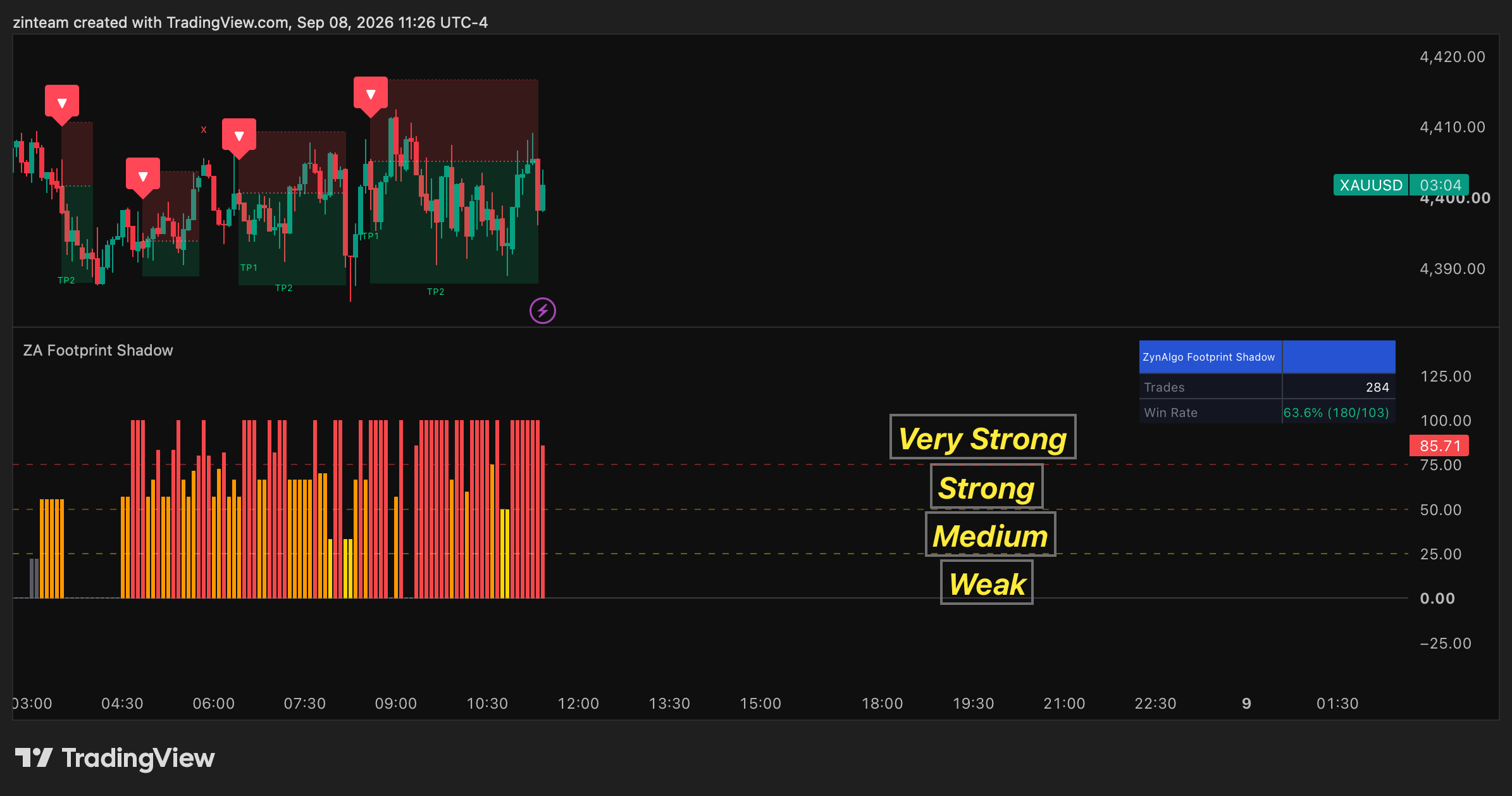
Price Footprint Shadow builds this picture directly. For every completed swing it slices the leg's price range into bins and counts how many bars overlapped each one. A bin that a single fast candle crossed once scores low. A bin price sat inside for many bars scores high. The result is condensed into Footprint Strength, a column in its own pane that runs from weak to very strong depending on how much of that dwell time history sits at the current price. It is built from bar ranges, not exchange volume, so it reads the same way on instruments that don't report reliable volume.
A tall column by itself is not a reason to act. It only says price is back inside a pocket where an earlier move paused. The tool treats a strong footprint as a precondition, not a signal, and waits for a rejection candle in the direction of the zone, checked against an internal trend filter, before it marks anything.
How it works in a real session

Picture a pullback on a two hour chart. Price is falling back toward a pocket left by a swing low from a few sessions earlier. As price approaches, the Footprint Strength column climbs, showing that this pocket carries real dwell time history. That alone changes nothing on the chart yet.
What you wait for is the candle: a bar with a lower wick clearly longer than its upper wick and its body, closing while the column is elevated and the internal trend read agrees with a bullish reaction. Only then does a marker print, on the open of the next bar, with a position box showing an ATR based stop and profit targets. Hovering the marker shows the reason in plain text: a footprint zone acting as support.
If a setup looks right but nothing prints, the tool has a cooldown label that shows how many bars a recent signal is still blocking new markers. That single check resolves most "why didn't it fire" moments before you start second guessing the setup itself.
Price Footprint Shadow TDV
Full specification, pricing and platform support live on the product page.

Who this fits
- Traders who draw support and resistance by hand and want the level backed by something more than a single wick touch.
- Reversal and pullback traders who buy dips into support or sell rallies into resistance, and want the candle to confirm the level before acting.
- Traders working FX, crypto, indices or CFDs, where exchange volume is unreliable or unavailable, since the footprint is built from price bars instead.
- Swing and intraday traders who want fewer, more spaced out markers rather than a marker on every wiggle.
What it does not do
Footprint Strength is a proxy for dwell time built from bar ranges. It is not exchange volume, and it does not claim to be. On an instrument where the underlying move is thin or erratic, a busy looking pocket can still mean very little.
A strong reading is not a forecast. Price can, and does, slice straight through a dense pocket with no rejection candle at all, and the tool stays silent in exactly that case because a marker requires the candle, not just the zone. The built in trend filter, cooldown, and alternation checks are deliberately conservative: they exist to keep the chart quiet, which also means real reactions during a very choppy or newly volatile stretch can go unmarked.
The position box drawn with each marker is an internal simulation for illustration. It is not a broker fill, and reaching a target on the chart is not the same as a filled trade in your account. This tool does not manage your position size, does not decide your overall market bias, and does not remove the need for your own stop placement.
Trading involves risk, and nothing in this article or in the indicator is financial advice. Signals can fail, markets can move against a confirmed setup, and no indicator removes that risk. Use your own risk management and position sizing on every trade.
Pairing it with other tools
Price Footprint Shadow answers one question: where did this swing leave a level worth watching, and did the market just confirm it. It does not measure how stretched price is from its recent average, and it does not manage an exit once you are in a trade.
If you trade markets where volume reporting is reliable, such as futures or major indices, Volume Deviation Bands looks at a different question: how far price has moved from a volume weighted mean, measured in the market's own participation rather than a fixed percentage. It is a separate read, not a replacement for a footprint zone.
For managing a position after entry, Dynamic Trail Regime is built around a different job again: classifying the current regime as trending or ranging and trailing a stop through it. Neither tool changes what Price Footprint Shadow shows you at the point of entry, they simply cover ground it does not.
Price Footprint Shadow is free and available on TradingView through the ZynAlgo marketplace. If your last stop out came from a level that looked fine on paper, it is worth seeing what that level's actual footprint would have shown you.
Price Footprint Shadow TDV
Pick a plan on the product page and it lands in your library right after checkout.