Session POC Indicator for NinjaTrader 8: Mapping Asia, London and NY Levels
The problem with a 24-hour chart
You pull up a futures or crypto chart and see one long, undifferentiated range. A high from 3 AM looks identical to a high from 10 AM. You mark a level, price taps it, and you have no way to know whether that level was built on real volume or on an overnight session nobody was watching. By the time you realize the level was thin, you are already stopped out.
This is the gap a session POC indicator for NinjaTrader 8 is built to close: not by predicting where price goes next, but by showing you which part of the day actually built the level you are trading against.
What Session Lite puts on the chart
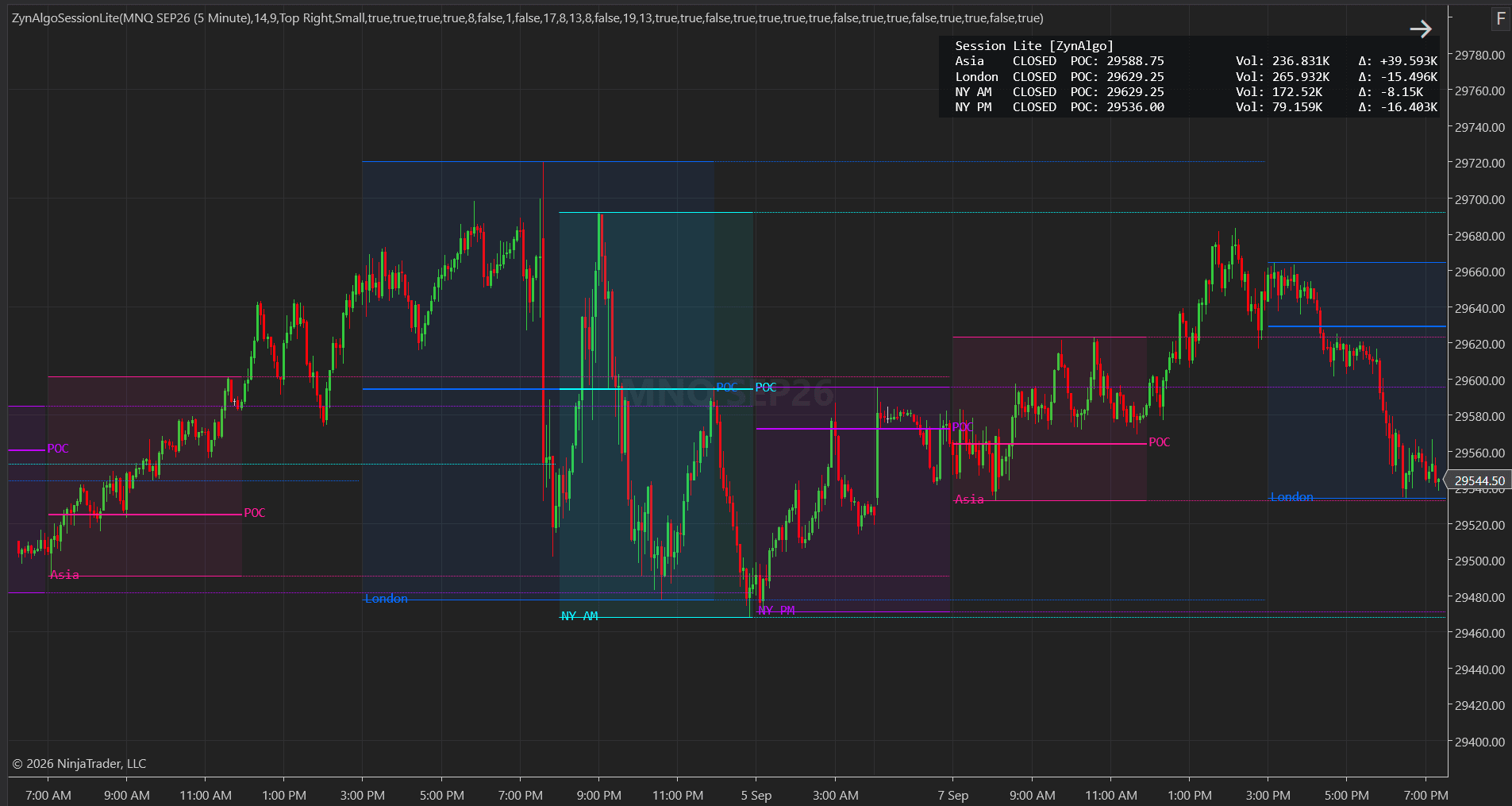
Session Lite [ZynAlgo] splits the trading day into four independent windows: Asia, London, New York AM, and New York PM. Each session gets its own boundary, drawn as a high line and a low line that widen as the session develops, with a shaded fill between them so the block reads at a glance.
Inside each session it also tracks:
- the price where the single heaviest-volume bar of that session traded, marked as a POC line
- the total volume transacted in the session
- the net direction of that volume (shown as "D", green when positive, red when negative)
- once the session ends, the high, mid and low carried forward as extended reference lines
A dashboard adds one row per session with a live countdown to that session's open or close, plus its POC, volume and delta figures.
Reading a session footprint in a real session
Say London is running into its final hour. The session block on your chart is a shaded rectangle with a POC line sitting a third of the way down from the high. The dashboard shows London's Vol figure is modest against the width of the range, and D is red despite the session closing near its high.
That combination is worth noticing before New York opens: a wide range built on comparatively light volume, with directional delta disagreeing with where price settled. It does not tell you to buy or sell. It tells you that the level New York AM opens against was defended by relatively little participation, which is different information than a high built on heavy, one-sided volume would give you.
When the next session opens directly into that carried POC, you are watching a level get retested while you already know something about how it was built. That is the entire function: turning an unlabeled range into a session footprint you can compare session to session.
Session Lite NT8
Separate your trading day into four sessions with live boundaries, volume anchors and participation totals, then carry each session's high, mid and low forward as reference levels.

Who this fits
- Traders who already think in Asia, London and New York terms and want those windows drawn consistently instead of marked by hand
- Intraday traders on futures, indices or crypto, where real transacted volume is available
- Traders who work from a small set of defensible reference levels rather than a constant stream of signals
- Anyone building a routine around session opens, who wants the prior session's high, mid and low sitting on the chart automatically
What it does not do
Session Lite is a context tool, not a signal generator. There is no arrow, no buy or sell label, and no stop or target logic anywhere in it. A few honest limits to know before buying:
- The POC line marks the single heaviest-volume bar in a session, not a full volume profile calculation. A later heavy bar will move it.
- Net delta ("D") is estimated from whether each bar closed above or below its own open, not from actual bid/ask exchange data.
- On spot FX, the feed reports tick volume rather than true transacted volume, so Vol and D should be read as a rough proxy there, not a precise figure.
- Weekends are excluded from the session logic, so no session blocks form on Saturday or Sunday bars.
- A session level is a reference point. It tells you where a session did its business, not what price will do when it gets there.
Trading involves risk, and nothing in this article or in Session Lite itself is investment advice. The indicator maps structure and participation on the chart; it does not remove market risk, and every trade decision, including sizing and timing, stays with the trader.
Pairing it with other tools
Session Lite is deliberately narrow: session boundaries, POC and volume delta, nothing else. Traders who want a closer, bar-by-bar look at delta beyond the session-level "D" reading sometimes add Tick Delta Pro NT8 alongside it. Traders who want the same session levels checked against a higher timeframe often place MTF Command Center NT8 next to it. Neither addition changes what Session Lite itself reports; each simply gives you a different lens on the same chart.
Session Lite NT8 is available in the ZynAlgo marketplace for traders who want session structure, POC and volume delta on their own NinjaTrader 8 chart.
Session Lite NT8
Separate your trading day into four sessions with live boundaries, volume anchors and participation totals, then carry each session's high, mid and low forward as reference levels.